By Zach Warshawsky, Co-Founder and Chief Operating Officer, Profitable Media. 25+ years in sales, marketing and operations, building marketing technology for businesses scaling from seven to nine figures. He writes about measurement infrastructure: GA4, tag management, server-side tracking, attribution, and the data pipelines underneath them.
Key takeaways
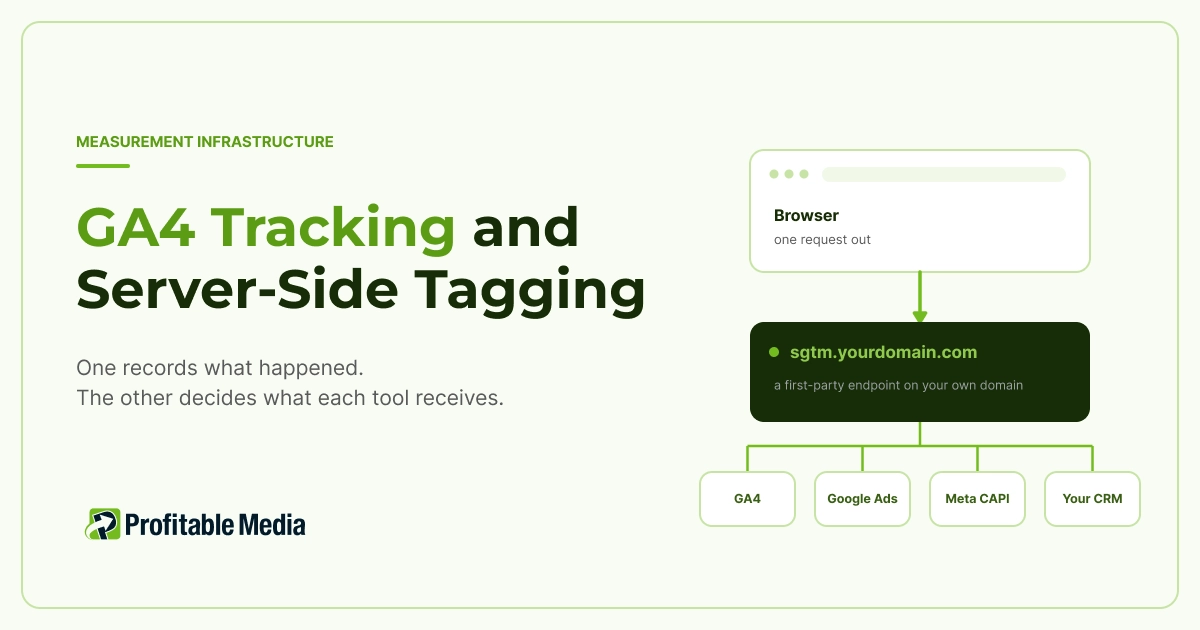
- Server-side tagging moves collection out of the browser and onto a server on your own domain. The browser makes one request; the server forwards to GA4, Google Ads, Meta, your CRM and anywhere else you send data.
- It fixes delivery, not design. If GA4 already disagrees with your order table, fix your events first, because a server container forwards a broken event just as reliably as a good one.
- Run client-side and server-side tags together without deduplication and you will double-count conversions. Meta matches duplicates on a shared event ID within 48 hours. GA4 matches purchases on transaction ID.
- Consent Mode v2 is what lets Google fill in conversions from people who decline cookies. The more accurate version of that modeling needs 700 ad clicks over seven days in a given country before it runs at all.
Your ad platforms decide where to spend your budget using the conversion data you send them. Send an incomplete picture and they optimize against it, which costs you twice: once in budget spent on the wrong audiences, and again in decisions made from inaccurate reports. That is the reason measurement setup deserves attention.
What this hub covers
This page works through a measurement stack in the order its layers depend on each other. It covers what GA4 records, how to design events, what server-side tagging adds, how consent governs all of it, how data reaches your ad platforms and CRM, and when you need a data warehouse. It closes with the four failure patterns behind most broken setups, and five checks you can run yourself.
Who this is for: ecommerce, lead gen and multi-channel teams
This is for you if you sell online, generate leads, or run paid media across more than two channels. It assumes you already have GA4 installed and are not certain you can trust it.
GA4 tracking foundations
GA4 records your site as a stream of events. Someone views a page, that is an event. They add to cart, start checkout, submit a form, buy: all events. Each event can carry parameters, the details that make it useful, like order value, currency, or which form was submitted.
GA4 property, data stream and key events
A property is the container for one business’s data. A data stream is the connection between a website or app and that property, and it issues the measurement ID your site sends data to. Key events are the events you have told GA4 matter commercially. That is what turns a raw purchase event into something reportable as a conversion and makes it importable into Google Ads.
Most sites send this data through Google Tag Manager. Your site pushes information into a data layer, GTM watches for it, and tags fire when their conditions are met. The advantage is that changing what you track becomes a change in GTM rather than a development ticket.
Everything so far happens in the browser. The browser runs the tag, sets the cookie, and sends the request to Google. That is client-side tracking, it is how most sites still work, and it is what server-side tagging changes.
Event design and measurement quality
Most GA4 problems start here, not in how the data gets delivered. Move badly designed events onto a server and you deliver them more reliably, which helps nobody.
Event naming, parameters, the data layer and debugging
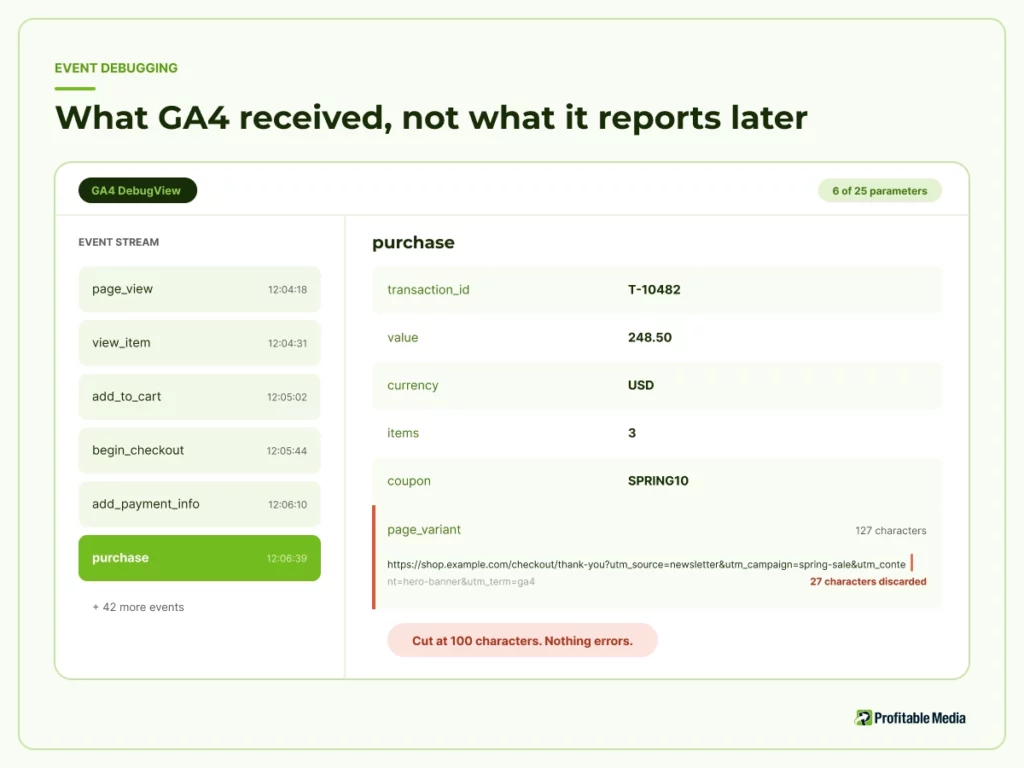
GA4 enforces hard structural limits. An event accepts 25 parameters. Parameter values are cut off at 100 characters, with exceptions for page title, referrer and location. A standard property allows 50 event-scoped custom dimensions, 25 user-scoped and 50 custom metrics. Nothing errors when you exceed these. Values are truncated, and a report stops telling two things apart.
Cardinality. When a dimension collects too many distinct values, GA4 bundles the tail into a row labeled (other), and what was inside cannot be recovered through the interface. Putting transaction IDs or full URLs into a custom dimension causes this reliably.
Naming drift. GA4 enforces no schema, so purchase, Purchase and purchase_complete coexist as three separate events, each holding part of your revenue.
The fix for both is a documented data layer: a written agreement covering every event name, its parameters and their formats, which the website and the container both follow.
For debugging, GA4’s DebugView shows events arriving in real time from a debug-enabled device, with every parameter expanded. It is the only place you see what GA4 actually received rather than what it later reports. It is where you catch a truncated value or a misnamed event before it reaches a dashboard.
Server-side tagging
Server-side tagging adds a second container that runs on a server instead of in the browser.
Web GTM vs server container, first-party endpoints, hosting
Your web container is the GTM you already have, running in the browser. A server container runs the same tags, triggers and variables model, but on a server you pay for.
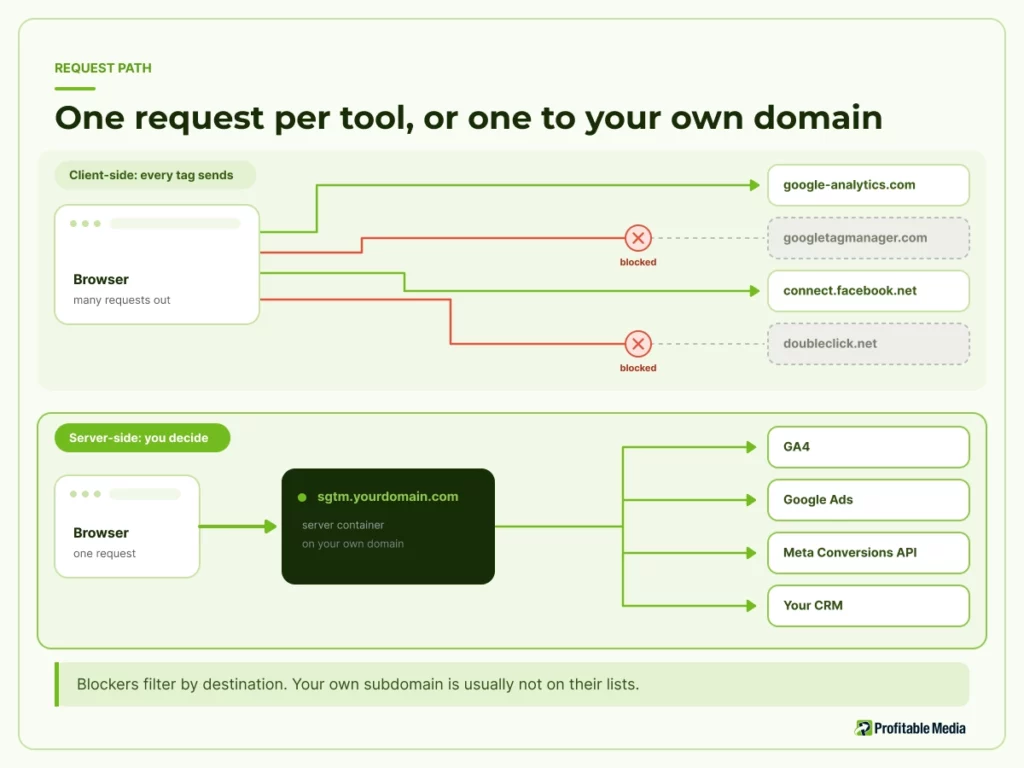
The browser makes one request, to a first-party endpoint on your own domain, something like sgtm.yourdomain.com. The server container receives it and decides what to forward, and where. GA4 gets the analytics event. Google Ads gets the conversion. Meta gets its version through the Conversions API. Your CRM, email platform and data warehouse can each get a copy shaped for what they need.
For hosting, Google runs it on Cloud Run or App Engine, and you can host it elsewhere. It is billed by usage, so cost scales with traffic.
Three things change once data flows this way.
Requests come from your domain. Content and ad blockers filter by destination. A request to googletagmanager.com is on those lists. A request to a subdomain of your own site generally is not, so some traffic that disappeared client-side arrives.
You decide what each tool sees. Client-side, every tag on the page can read the page. Server-side, you strip personal data before it leaves your infrastructure. You send each platform only the fields it needs. And you hold one definition of a conversion across tools that would otherwise each invent their own.
Cookies can be set by the server. Safari caps cookies written by browser JavaScript at seven days, which shortens the window in which a returning visitor is recognized as the same person. A cookie set in a server response is not a browser-written cookie, so the cap can be avoided.
If your endpoint points at a hosted server using a CNAME record, which is the quickest way to set it up, Safari treats it as CNAME cloaking and applies the seven-day cap anyway. Ask whoever builds yours how the endpoint is configured, because the answer decides whether you get the benefit you paid for.
Privacy and consent
Consent Mode is how Google’s tags respond to a visitor’s cookie choices, and it governs everything above regardless of where your tags run.
Consent Mode v2, modeled conversions, what still gets sent
Consent Mode v2 defines four signals. ad_storage and analytics_storage control cookie use for advertising and analytics. ad_user_data and ad_personalization control whether user data is sent to Google and used for personalized ads.
There are two ways to implement it. In basic mode, Google’s tags are blocked until someone interacts with your banner, and nothing at all is sent before that. In advanced mode, tags load with consent defaulting to denied and send cookieless pings, which carry no identifiers and cannot be used to build profiles or remarketing lists.
That choice determines your modeled conversions, which are Google’s estimates of the conversions it cannot see because a visitor declined cookies. Basic mode gets a general model. Advanced gets an advertiser-specific model built on your own data, and that better version has a minimum of 700 ad clicks over a seven-day period, per country and per domain grouping. Sell into six markets and you may clear it in your largest and miss it in the rest.
Modeled conversions are estimates, not observations. Google states plainly that it cannot see whether an unconsented conversion had an ad click behind it. Denying consent does not stop everything either. The page URL still reaches Google, including any ad click information in it.
Data activation
Once data reaches your server container, the work becomes getting it to each destination without counting anything twice.
Google Ads, Meta CAPI, CRM and offline conversions
Google Ads takes conversions imported from GA4 key events. That is usually the cleanest route, because deduplication has already happened upstream.
Meta deduplicates by matching an event ID and event name across the browser pixel and the Conversions API. It only does this for events arriving within 48 hours of the first one carrying that ID. Send both without a shared event ID and every purchase counts twice.
CRM and offline conversions come in through the Measurement Protocol, which sends events server to server. It is designed to add to your tracking, not replace it. Google is explicit that events sent this way may appear in only some reports, and certain reserved event names cannot be sent at all. It is the right tool for pushing a closed deal from Salesforce or HubSpot back into your measurement, and the wrong tool for rebuilding tracking from scratch.
Data warehouse layer
The usual reason given for exporting GA4 to BigQuery is better reporting. The better reason is that GA4 forgets.
BigQuery export, limits and schema basics
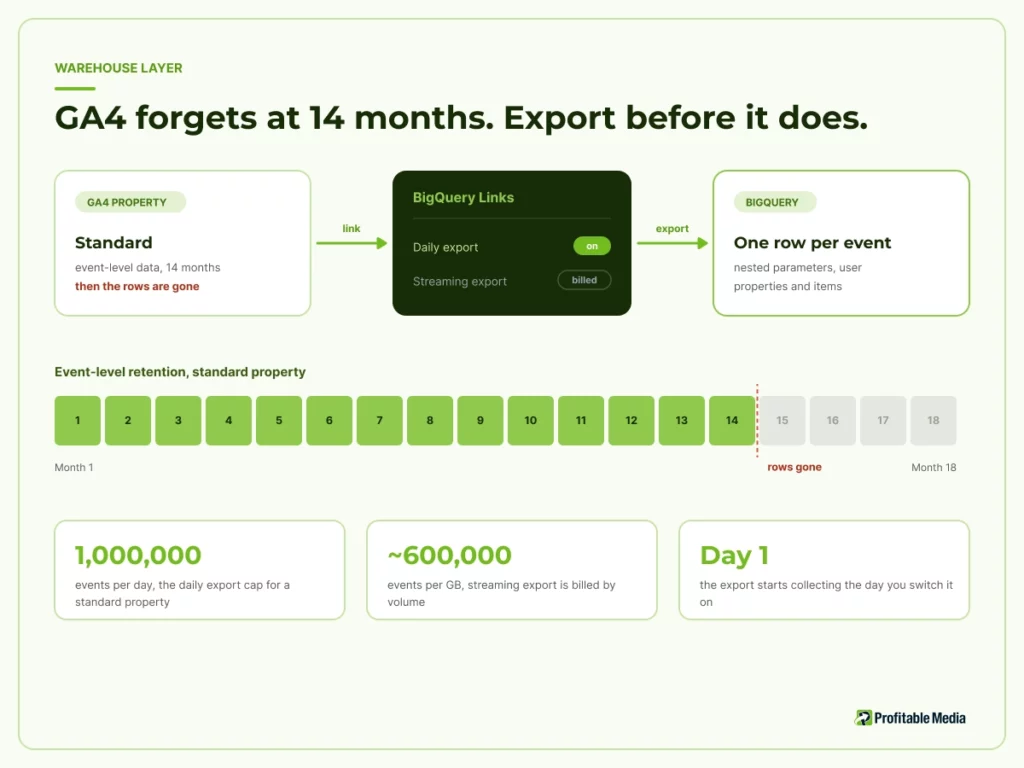
A standard property keeps event-level data for a maximum of 14 months. Analytics 360 extends that, and large standard properties are held to two months. Past your retention window the rows are gone. If you want to compare this year to last, the export is the only way to still have last year.
Two limits matter. A standard property exports up to one million events per day. And the daily export is included while streaming export is billed by volume, roughly 600,000 events per gigabyte, plus normal BigQuery storage and query costs. Free to switch on, not free to run at scale.
The export gives you one row per event, with nested fields for parameters, user properties and ecommerce items. That nesting is why BigQuery answers questions the GA4 interface cannot, and also why it takes real SQL. The export contains the raw events GA4 received, so it inherits every event-design problem above rather than correcting any of them.
Common failure patterns
Four problems account for most of the broken setups we see, and each points at a different layer.
Duplicate events, broken attribution, payment gateway gaps, consent misconfiguration
Duplicate events. Client-side and server-side tags running together without deduplication. The symptom is conversions that exceed orders, which reads as good news until someone reconciles. Fix it at the source with shared event IDs for Meta and transaction IDs for GA4 purchases. Sending an empty transaction ID makes GA4 collapse every one of those purchases into a single event, turning a small mistake into a severe undercount.
Broken attribution. Usually GA4 and an ad platform disagreeing, which is normal, because they use different windows, conversion definitions and credit rules. Before assuming data is missing, compare GA4 against your order table instead. That isolates real loss from definitional difference.
Payment gateway gaps. When a customer moves to a checkout on another domain, the linker parameter that keeps their session intact can be stripped by a redirect. One customer becomes two users in two sessions, and the original traffic source is lost at the exact moment the money arrives. This is the most expensive failure on the list and the least visible.
Consent misconfiguration. Running basic mode while reporting as though modeling is active, or sitting below the 700-click threshold in a market and treating modeled conversions there as measured. Both produce numbers that look fine and are not.
Do you need server-side tagging?
It is probably worth building if any of these apply.
- Your paid media spend is large enough that a few percentage points of recovered conversion data changes what the platforms optimize toward.
- You send data to four or more tools and want one definition of a conversion across them.
- Compliance rules make it valuable to strip personal data before it leaves your infrastructure.
- Your checkout sits on a separate domain.
It is probably not worth it yet if any of these apply.
- Your ad spend is small enough that better attribution changes no decision.
- Your GA4 numbers are wrong today for reasons you have not diagnosed.
- Nobody will own the container after it is built.
- You are doing it because you heard third-party cookies are going away. Google confirmed in April 2025 that it will not remove them from Chrome, and in October 2025 retired most of the replacement technologies it had been building.
You will be quoted recovery percentages, often between 30% and 50%. How much you recover depends entirely on your visitors’ browser and blocker mix, so treat any number offered before someone has looked at your traffic as a sales figure. Ask what it was measured on.
Five checks you can run this week
- Reconcile one closed week. Count GA4 purchases against your order table for the same week and the same definition of a sale. Write the gap down as a count and as a percentage, and be clear which number you divided by.
- Look for (other). In any report using custom dimensions, an (other) row means a dimension exceeded its cardinality limit and those values are unrecoverable.
- Walk your own checkout with GA4 debug on. When you land on the payment domain, check whether the _gl parameter survived the redirect.
- Identify your consent mode, then check ad clicks per country against the 700-click threshold.
- Count your parameters. Take your heaviest event, count against 25, check custom dimensions against 50, and look for values likely to exceed 100 characters.
If checks 1, 2 and 5 come back clean and a gap remains, delivery is a plausible cause and server-side tagging is worth pricing. If they do not, fix those first. Everything else sits downstream of them.
Start with the layer that is actually broken
GA4 tracking and server-side tagging solve different problems. GA4 tracking is about recording the right things in a consistent shape. Server-side tagging is about getting that record delivered intact to every tool that needs it, on your terms rather than the browser’s.
Most teams reach for the second when the first needs work. Reconcile a week, find the layer producing the gap, then decide what to build.
If you would rather someone else ran those checks, our team does a free GA4 audit that reconciles your tracking against actual revenue and returns a written report, layer by layer. You can also read more about our Google Analytics 4 and data visibility work, or the browser privacy background in our guide to third-party cookies in a privacy-first world.
Frequently asked questions
Does server-side tagging stop ad blockers?
It helps, and how much depends on your traffic. Blockers filter by destination, so a request to a subdomain of your own site is usually not on the lists that block Google and Meta domains. What that recovers varies with your visitors’ browsers and blocking tools, which is why a specific percentage quoted without measuring your site first should be treated with suspicion.
Will server-side tagging make GA4 match Google Ads?
No, and nothing will, because they count different things. The platforms use different attribution windows, conversion definitions and credit rules, so they would disagree on perfect data. Compare GA4 against your order table instead. That isolates data going missing, which is the part server-side tagging can address.
How much does a server container cost to run?
It is hosting, billed by usage, so it scales with traffic rather than being a flat license. Budget for the server, the build, and someone to maintain it. An unmaintained container that stops forwarding is worse than not having one, because the reports still look populated.
Do I still need Consent Mode if I use server-side tagging?
Yes. Consent Mode governs what Google’s tags may do with storage and user data, and that applies wherever the tags run. Server-side tagging changes the delivery route, not the legal basis or the visitor’s choice. When advertising storage is denied, the page URL still reaches Google, including any ad click information in it.
Does this work with Shopify or a hosted checkout?
Yes, though the checkout hop is where these setups most often break. When a customer moves to a checkout on a different domain, the linker parameter keeping their session intact can be stripped by a redirect. Test your own checkout end to end before assuming it works, whatever platform you are on.
Sources
Google, Server-side Tag Manager, Tag Platform developer documentation.
Google, Event collection limits, Analytics Help. Figures are for standard properties; 360 raises some of them.
Google, [GA4] About custom dimensions and metrics, Analytics Help.
Google, BigQuery Export, Analytics Help. Prices are current as of publication and change.
Google, Data retention, Analytics Help.
Google, [GA4] Minimize duplicate key events with transaction IDs, Analytics Help. Applies to web data streams.
Google, [GA4] Set up cross-domain measurement, Analytics Help.
Google, Measurement Protocol, Analytics developer documentation.
Google, Set up consent mode on websites, Tag Platform developer documentation.
Google, Set up consent mode, Analytics Help.
Google, About consent mode modeling, Google Ads Help.
Google, Next steps for Privacy Sandbox and tracking protections in Chrome, 22 April 2025.
Google, Update on Plans for Privacy Sandbox Technologies, 17 October 2025.
John Wilander, Full Third-Party Cookie Blocking and More, WebKit, 24 March 2020. Describes Safari behavior as published; Apple has not restated it since.
John Wilander, CNAME Cloaking and Bounce Tracking Defense, WebKit, 12 November 2020. Same caveat.
Meta, Handling Duplicate Pixel and Conversions API Events, Marketing API developer documentation.
Author
Zach Warshawsky is Co-Founder and Chief Operating Officer of Profitable Media, which has built and run marketing technology for businesses scaling from seven to nine figures since 2009. He has spent 25+ years in sales, marketing and operations, and writes about measurement infrastructure: GA4, tag management, server-side tracking, attribution and the data pipelines underneath them.