By Dylan Jones, Operations Manager at Profitable Media. Dylan writes about the operator’s view of the stack: choosing platforms, what they cost at scale, and what keeps customers paying after the first sale.
Key takeaways
- We judged Circle’s features on a single test: does each one give members a reason to renew, or warn the owner before they leave? Recurring live events, drip courses, and activity scores pass. The custom branded app, which Circle sells only with Circle Plus, does the least for renewals.
- The retention messages can run from the owner’s own CRM on any Circle plan. Circle includes Zapier on every plan, and Zapier passes failed payments, cancellations, RSVPs, and course completions to the CRM the business already uses. Circle’s full workflows start on Business at $199, along with activity scores that flag members drifting away.
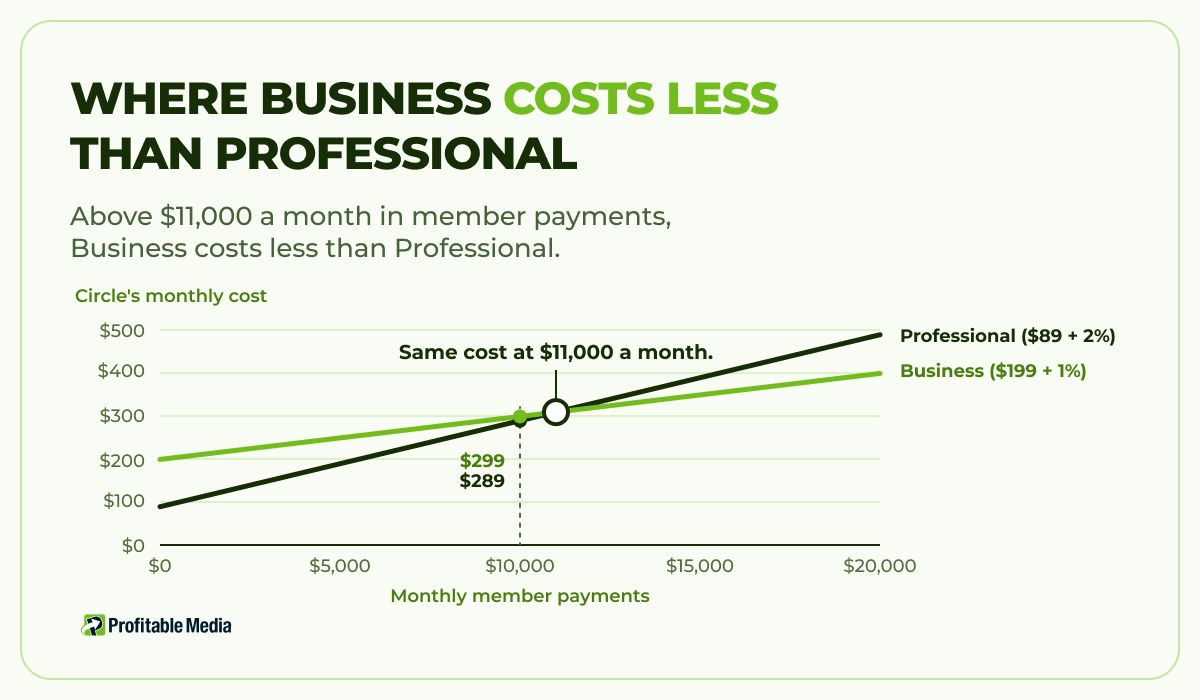
- We priced Professional and Business on the same community, adding Circle’s fee on member payments to each plan’s price. At $11,000 a month in member payments both cost $309, and above that Business costs less, because Circle takes 1% on Business against 2% on Professional.
- Circle supplies the triggers, and the owner writes what they set off. The failed-payment messages, the offer to a member who clicks cancel, the win-back sequence, and the upgrade offer months after joining all stay with the owner, along with the Stripe settings that decide when a failed card ends a membership.
Circle suits a paid community that runs on regular live events, as long as someone sets up the retention work, either in Circle’s own workflows or in the owner’s CRM. Profitable Media builds the onboarding, failed-payment, cancellation, and win-back flows that keep members paying, and connects Circle to the CRM you already use. See how we raise member lifetime value.
What is Circle?
Circle sells to creators, coaches, and brands that charge for access. One Circle community holds discussion spaces, chat, member profiles, live events and streams, courses, and paywalls that charge members through the owner’s Stripe account. Every plan includes Circle’s iOS, Android, and desktop apps.
Circle sells four plans, all with unlimited members: Professional, Business, Scale, and Circle Plus. Circle sells email marketing as a separate add-on, Email Hub.
Which Circle features keep members paying?
Recurring live events, drip courses, and activity scores do the most to keep members paying, and the custom branded app does the least. A paid community earns its money month by month: a member paying $50 a month brings in $300 over six months and $1,200 over two years, and the owner pays to acquire that member once.
Live events and streams
Recurring live events give members a fixed date to come back for. Circle schedules one-off or recurring events, can send an in-app reminder an hour before each one, and lets the host add custom email reminders. When a live session ends, Circle can post the recording to the event page, so a member who missed the call can still watch it.
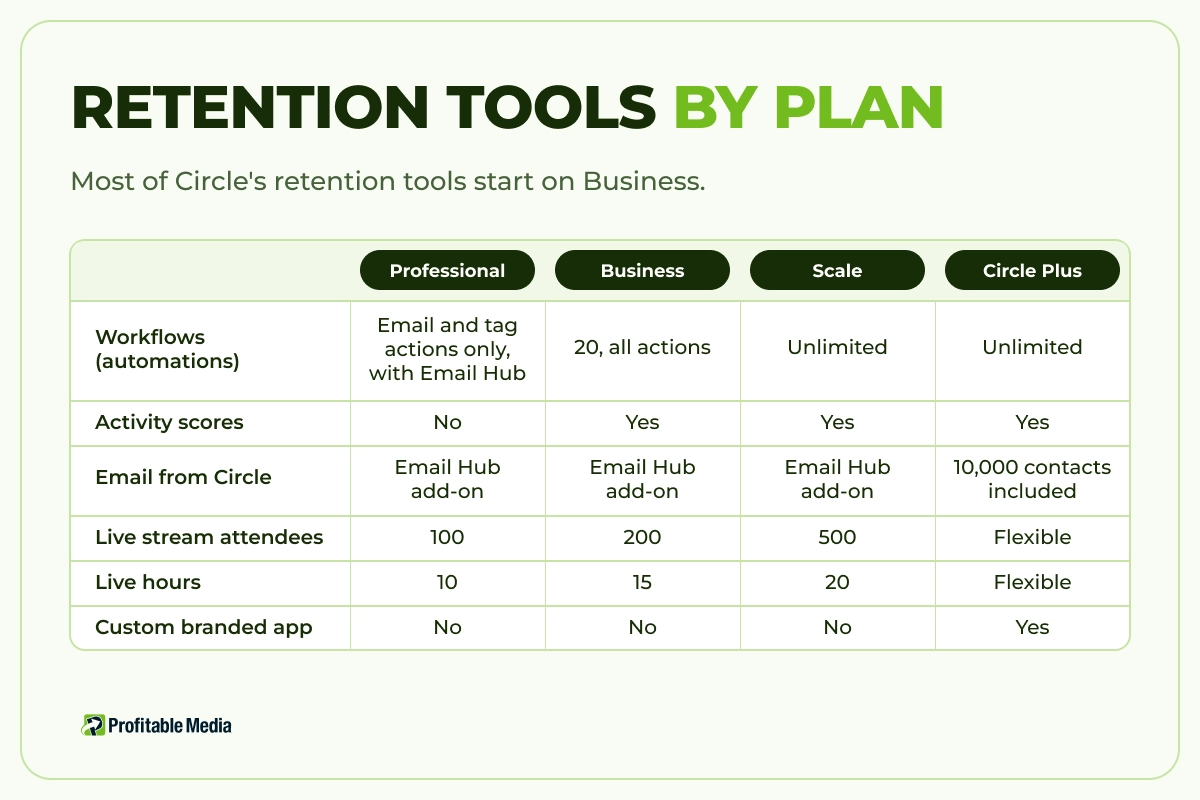
Each plan caps live sessions. Professional allows 100 live stream attendees, 15 live room participants, and 10 live hours. Business raises those to 200, 20, and 15, and Scale to 500, 50, and 20. A community whose main draw is a weekly group call should check those caps against its calendar before choosing a plan.
Courses with drip release
Circle’s courses help retention when they release content over time. Its Structured course type unlocks each section a set number of days after a member enrolls, and the Scheduled type unlocks sections on dates the owner picks. A self-paced course releases everything on day one, so a member can finish it in the first month and has less reason to renew. A drip course keeps something new arriving for as long as the program runs.
Activity scores
Activity scores are Circle’s early warning for churn. Circle rates each member from 1 to 10 on the past 30 days of visits, posts and comments, likes and event RSVPs, and direct-message conversations, and refreshes the scores every two weeks. Admins can filter members by score and target a score range in workflows and email broadcasts, so a member whose score drops can get a personal message before the next renewal. New members wait up to 44 days for a first score. Activity scores start on Business.
The Circle community app
Every plan includes the standard Circle app on iOS and Android, which puts the community and its notifications on members’ phones under Circle’s own app listing. Circle offers the custom branded app only on Circle Plus and prices it on request. It lists the community under its own name in the app stores and adds its own push notifications and in-app payments. The branded app suits a large community where the brand matters to members, but for renewals it adds little over the standard app.
Paywalls and failed payments
Circle’s paywalls charge members by subscription, installment plan, or one-time fee, with free or paid trials and coupons, through a Standard Stripe Connect account. Since January 2026, a paywall checkout can also offer upsells: a second product or membership the buyer can add while paying.
A failed card can end a membership the member still wanted, and Circle relies on Stripe to recover the payment. When a renewal charge fails, Circle marks the subscription Past due, and Stripe retries the card on the schedule the owner sets in Stripe. A custom policy allows up to three retries over at most 27 days, or Stripe’s Smart Retries picks the timing. The owner’s Stripe settings also decide what happens after the last retry: Circle removes the member from the paid spaces only when that setting is “Cancel the subscription”. The member’s Circle account stays open, along with any free spaces.
Stripe, not Circle, sends the failed-payment and expiring-card emails, and the owner sets them up in Stripe. Check the retry policy, the final outcome, and the emails before the first renewal date.
| Retention tool | Professional | Business | Scale | Circle Plus |
|---|---|---|---|---|
| Workflows (automations) | Email and tag actions only, with Email Hub | 20, all actions | Unlimited | Unlimited |
| Activity scores | No | Yes | Yes | Yes |
| Email from Circle | Email Hub add-on | Email Hub add-on | Email Hub add-on | 10,000 contacts included |
| Live stream attendees | 100 | 200 | 500 | Flexible |
| Live hours | 10 | 15 | 20 | Flexible |
| Zapier (to your CRM) | Yes | Yes | Yes | Yes |
| Custom branded app | No | No | No | Yes |
How much does Circle cost?
Circle costs $89 a month on Professional, $199 on Business, and $419 on Scale when the owner pays annually. Circle Plus has custom pricing. Every plan starts with a 14-day free trial.
| Plan | Price (billed annually) | Fee on member payments | Admins | Spaces |
|---|---|---|---|---|
| Professional | $89/mo | 2% | 3 | 20 |
| Business | $199/mo | 1% | 5 | 30 |
| Scale | $419/mo | 1% | 10 | 100 |
| Circle Plus | Custom | 0.5% | Unlimited | Flexible |
Circle’s fee comes on top of Stripe’s own processing fee, which runs 2.9% plus 30 cents per US card payment. Email Hub adds $99 a month for 10,000 contacts on every plan below Circle Plus, after a free first 30 days. Circle needs Email Hub to send any automated email, on Professional and Business alike. An owner who already runs a CRM can skip Email Hub and send those emails from the CRM instead.
The transaction fee changes which plan is cheaper. Take a community of 200 members paying $50 a month, or $10,000 in member payments. Professional costs $89 plus 2% ($200), or $289 a month. Business costs $199 plus 1% ($100), or $299. At $11,000 a month the two plans cost the same, and above it Business costs less and adds Circle’s full workflows and activity scores. Our guide to where to sell digital products compares the fees on 13 selling platforms.
What does Circle leave the community owner to build?
Circle provides a trigger for each point where a member is likely to leave, and the owner has to write and run what happens next. Its workflows can fire on “Failed recurring payment”, “Subscription scheduled to cancel”, and “Subscription cancelled”. On Business, those workflows can respond with a direct message, a push notification, a tag, a coupon on the subscription, or a change of subscription. On Professional, the same triggers run only with Email Hub, and only to send an email or change a tag.
Four jobs stay with the owner:
- The failed-payment sequence. Stripe sends a standard email. A short sequence in the community’s own voice, plus a direct message inside Circle, gives members who never meant to leave a clear way to fix their card.
- The cancel offer. “Subscription scheduled to cancel” fires the moment a member clicks cancel, while they still have the rest of the paid period. That window is the time to offer a pause, a cheaper plan, or a coupon, and someone has to decide which.
- The win-back. After cancellation, the member keeps a Circle account and any free spaces, so the owner can still reach them inside the community. Bringing them back takes a sequence the owner writes and schedules.
- The upsell after joining. Circle’s checkout upsell covers the moment of purchase. An offer three months in, such as an annual plan or a coaching tier, needs a timed message, the copy, and a decision about which members get it.
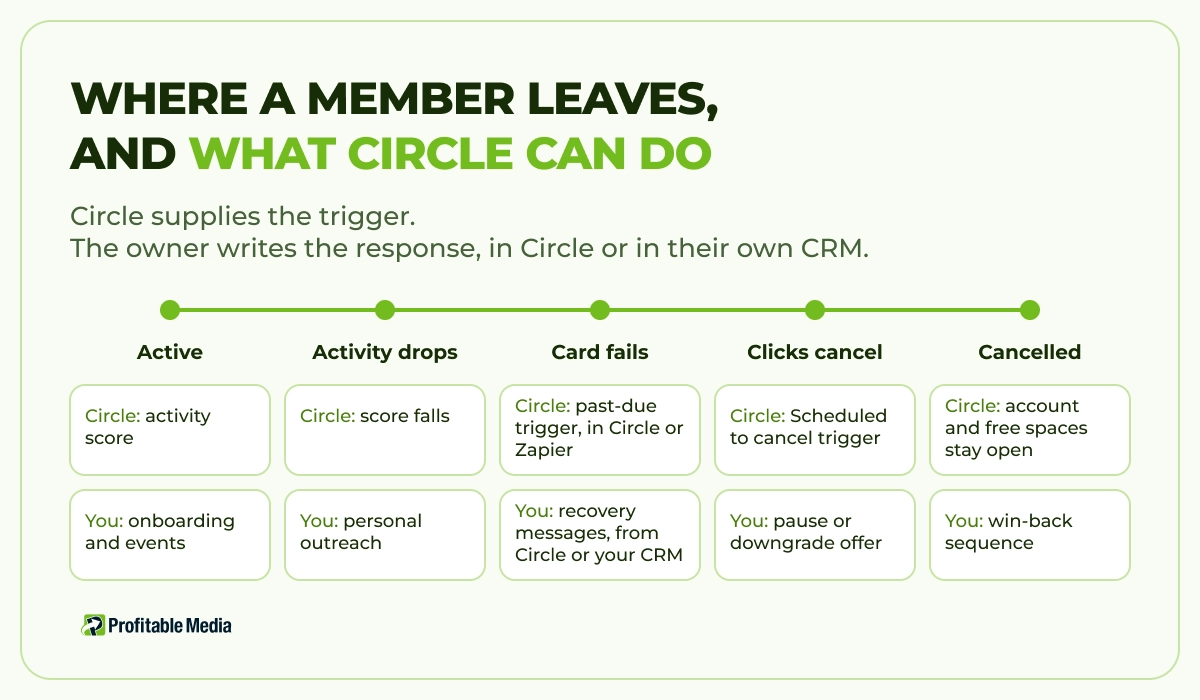
Circle doesn’t have to send any of these messages. Zapier’s Circle app, which Circle includes on every plan, fires when a subscription goes past due or a member cancels, when a member pays or RSVPs, and when a member finishes a course. It can also send a direct message or tag a member back in Circle. That lets the CRM the business already uses send the failed-payment, win-back, and upsell messages, even on Professional without Email Hub. Circle charges members through the owner’s own Stripe account, so a CRM with a Stripe connection can also read failed charges straight from Stripe. The cancel offer is the exception: Zapier’s Circle app has no trigger for a scheduled cancellation, so catching a member at the moment they click cancel takes Circle’s own workflows on Business.
Whichever tool sends the messages, the work sits in deciding the offers, writing the messages, and checking each month which ones bring members back. That is what our lifetime value engineering team builds and maintains for clients: onboarding, failed-payment recovery, cancellation offers, and win-back flows, running from the CRM you already use.
Some owners also need a different checkout. Circle’s checkout sells Circle paywalls, so when the community is one product in a larger offer, such as a course, coaching, or a physical product, a funnel and checkout the owner controls can sell all of it in one order, with upsells across the whole offer. Zapier on any plan, or Circle’s API from Business up, lets that checkout add each buyer to the paid spaces. See how we build funnels and checkouts.
Who is Circle a good fit for?
Good fit:
- Paid communities that run on a weekly live call, cohort, or event calendar.
- Owners who already run a CRM, or who will pay for Business to use Circle’s own workflows.
Not a good fit:
- Owners on Professional who expect Circle itself to chase failed payments and cancellations. Unless the owner adds Email Hub or connects a CRM, nothing sends those messages.
- Someone starting a small group who wants the simplest possible setup. Our Skool review covers a simpler option.
- Businesses that sell the community as one part of a bigger offer and want a single checkout for all of it.
Keep the members you already have
If you want members to stay longer, book a 30-minute call with Profitable Media. Bring your Circle plan, your member count, and your cancellations and failed payments from the last three months. We go through where your members drop off, and you leave with a plan for your onboarding, failed-payment, cancellation, and win-back flows: what each one does, what it costs to build, and what we maintain after launch.
Frequently Asked Questions
How much does Circle cost?
Circle costs $89 a month on Professional, $199 on Business, and $419 on Scale on annual billing. Circle Plus, the top plan, has custom pricing. Email Hub, Circle’s email add-on, costs another $99 a month for 10,000 contacts.
Does Circle charge transaction fees?
Yes. Circle takes 2% of member payments on Professional, 1% on Business and Scale, and 0.5% on Circle Plus. Stripe’s processing fee comes on top, at 2.9% plus 30 cents per US card payment. Above about $11,000 a month in member payments, Business costs less than Professional.
Does Circle have a mobile app?
Yes. Every plan includes Circle’s iOS, Android, and desktop apps. Circle offers a custom branded app, with its own name in the app stores and its own push notification manager, only on Circle Plus, and prices it on request.
Can Circle connect to a CRM?
Yes. Circle includes Zapier on every plan, and Zapier’s Circle app sends new members, payments, past-due and cancelled subscriptions, event RSVPs, and course completions to a CRM or email platform. It can also send direct messages and tag members back in Circle. Business and above add Circle’s API, and Scale adds webhooks.
What happens when a Circle member's payment fails?
Circle marks the subscription Past due, and Stripe retries the card on the schedule in the owner’s Stripe account. If every retry fails and the Stripe setting is “Cancel the subscription”, Circle removes the member from the paid spaces, and the member keeps their account and any free spaces.
Author
Dylan Jones is Operations Manager at Profitable Media. Dylan works on the operator’s side of the marketing stack: which platforms clients choose, what they cost at scale, and what keeps customers paying after the first sale. LinkedIn
Sources
All pages accessed 20 October 2026.
- Circle, “Pricing”, including the “Compare plan features” table. Plan prices, transaction fees, workflow, live, admin, and branded app limits, Zapier and webhook availability, Email Hub pricing, add-on prices, and the 14-day trial.
- Circle Help Center, “Understanding supported workflow triggers, audience rules, and actions”, last updated September 2026. Workflow triggers and actions, and the Email Hub requirement for sending email.
- Circle Help Center, “Set up failed payment settings and customer emails in Stripe”, last updated 25 March 2026. Retry policies and the emails Stripe sends.
- Circle Help Center, “Understanding the cancelation process for failed payments”. Past due and canceled statuses, and access removal.
- Circle Help Center, “Workflow overview”, last updated September 2026. Workflow plan availability, and the Professional plus Email Hub limits.
- Circle Help Center, “How do I manage member removal for paywall subscriptions?”, last updated 25 March 2026. What a member keeps after cancellation.
- Circle Help Center, “Getting started with Circle paywalls”, last updated 10 November 2025. Price types, trials, coupons, and Stripe Connect.
- Circle Help Center, “Access activity scores”. How Circle scores member activity.
- Circle Help Center, “Guide to Circle live events”, “Set up custom event reminders”, and “Understanding event notifications”. Recurring events, reminders, and recordings.
- Circle Help Center, “Utilizing the drip feature for structured and scheduled courses”. Course drip types.
- Circle Help Center, “Get to know access groups”. Access groups and the Admin API.
- Zapier, “Circle integrations”. Circle triggers and actions available through Zapier.
- Circle Community, “January release: Introducing upsells, your new admin dashboard, and more”. Paywall upsells.
- Stripe, “Pricing & Fees”. Standard US card rate.