By Dylan Jones, Operations Manager at Profitable Media. Dylan writes about the operator’s view of the stack: choosing platforms, what they cost at scale, what breaks in a migration, and when to stop paying for one.
Key takeaways
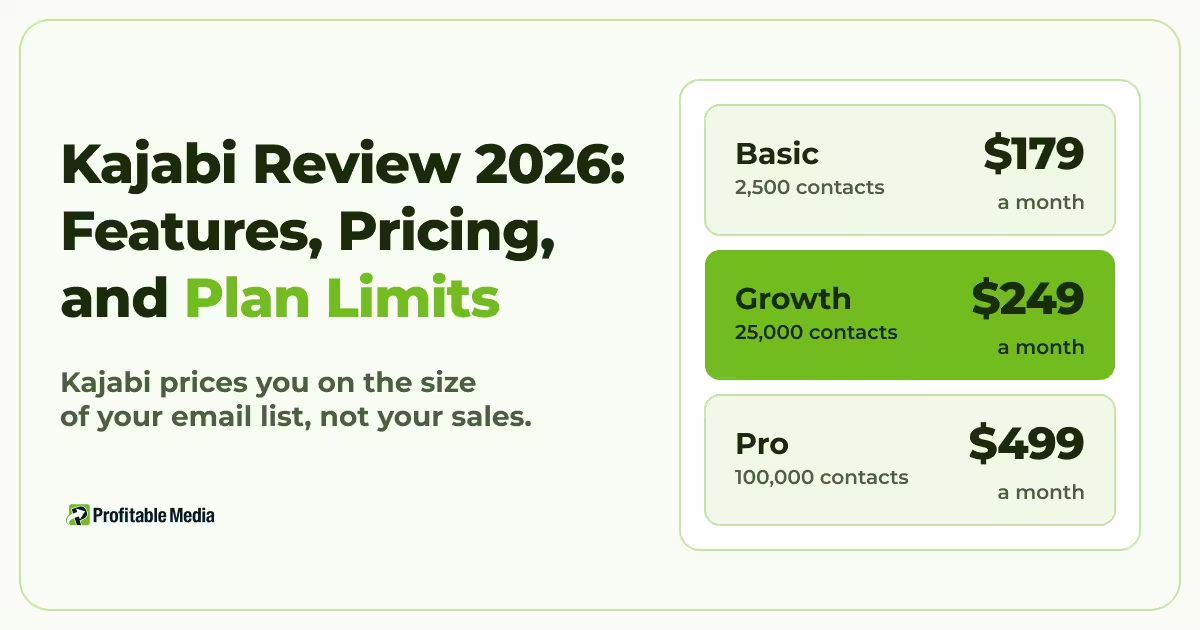
- Kajabi prices you on the size of your email list, not your sales. Each plan caps the list, the cap counts people who unsubscribed, and going over means upgrading or paying for extra contacts, even when sales stay flat.
- Connecting your own Stripe account to Kajabi costs extra. New plans add up to 2% to every sale you process through Stripe inside Kajabi instead of through Kajabi Payments.
- We priced Kajabi for a creator selling $30,000 a month, from 300 sales of a $100 course. On the Growth plan, platform and payment fees come to $1,179 a month with Kajabi’s own payments and $1,509 with your own Stripe account.
- For a creator growing a list with ads, the better setup keeps Kajabi for the course and runs the funnel and checkout outside it. Only buyers then count toward Kajabi’s list limit, you control what every sale reports to your ad accounts, and every buyer still gets instant course access.
Kajabi is worth it if you want courses, a community, coaching, and email in one place without connecting separate tools. It costs $179 to $499 a month, and the plan you need depends on the size of your email list, not your revenue. Once you start running paid traffic and your list grows, Kajabi becomes an expensive place to run your funnel. Keep it for the course, and move the funnel and checkout to a system you own.
Profitable Media builds and maintains custom funnels and checkouts for clients, including ones that deliver the course through Kajabi. See how we build funnels and checkouts.
What is Kajabi?
Kajabi is an all-in-one platform for selling online courses, coaching, communities, and memberships. It hosts the product, the website and landing pages that sell it, the email list, the checkout, and the student login, so a creator can run the business without connecting separate tools.
The platform covers the main product types a creator sells:
- Courses, either evergreen or run as a cohort with live sessions.
- Coaching, one-to-one or in groups, with scheduling through Calendly.
- Communities, where members post, comment, and message each other.
- Newsletters and podcasts, including paid and private ones.
- Downloads, such as templates and workbooks.
Around those products, Kajabi runs the marketing. Every plan includes unlimited landing pages, funnels, and marketing emails, plus Kajabi Payments, which accepts cards, Apple Pay, Google Pay, and Afterpay.
The case for Kajabi is one login and one bill. The case against it is the price. Kajabi’s own pricing page asks whether Kajabi is expensive for a course platform, and answers yes, if course delivery is all you need.
How much does Kajabi cost?
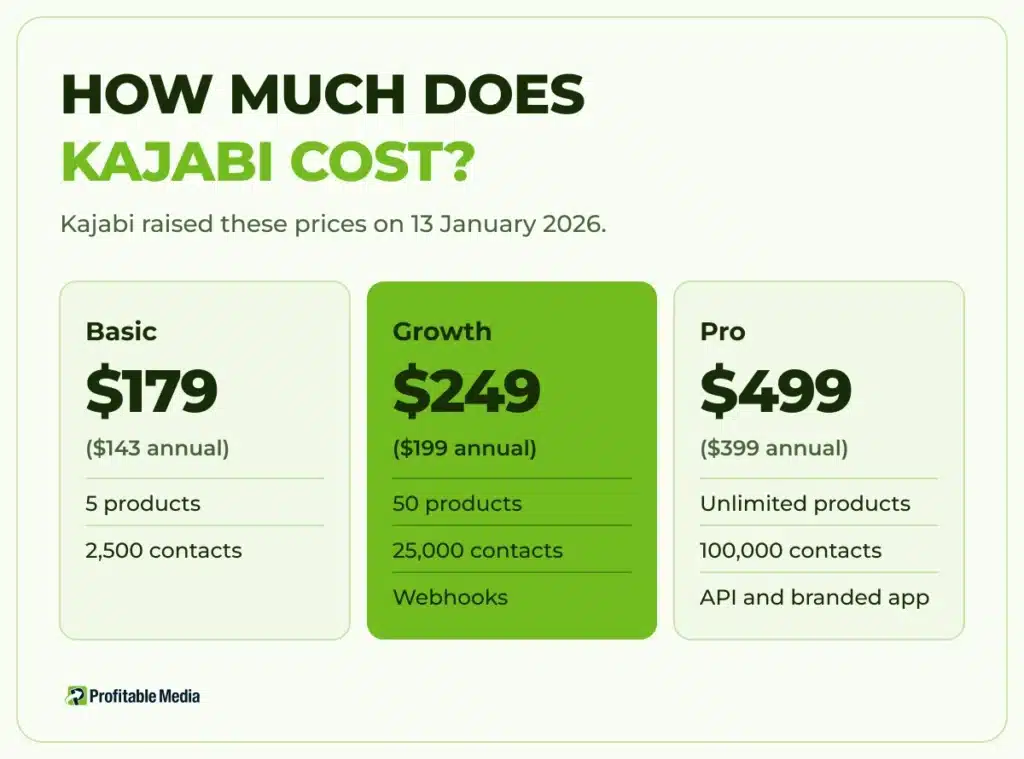
Kajabi costs $179 a month on Basic, $249 on Growth, and $499 on Pro. Billing annually cuts about 20%, to $143, $199, and $399 a month.
| Plan | Monthly | Billed annually | Products | Contacts | Admin users | Websites |
|---|---|---|---|---|---|---|
| Basic | $179 | $143/mo | 5 | 2,500 | 2 | 1 |
| Growth | $249 | $199/mo | 50 | 25,000 | 11 | 1 |
| Pro | $499 | $399/mo | Unlimited | 100,000 | 26 | 3 |
Growth adds advanced automations and webhooks, and Pro adds the features listed below. Kajabi raised these prices on 13 January 2026. Accounts on older plans got the same rise from their first bill after that date, except Founder and Beta Invite plans.
Kajabi offers a free trial, and every plan carries a 30-day money-back guarantee.
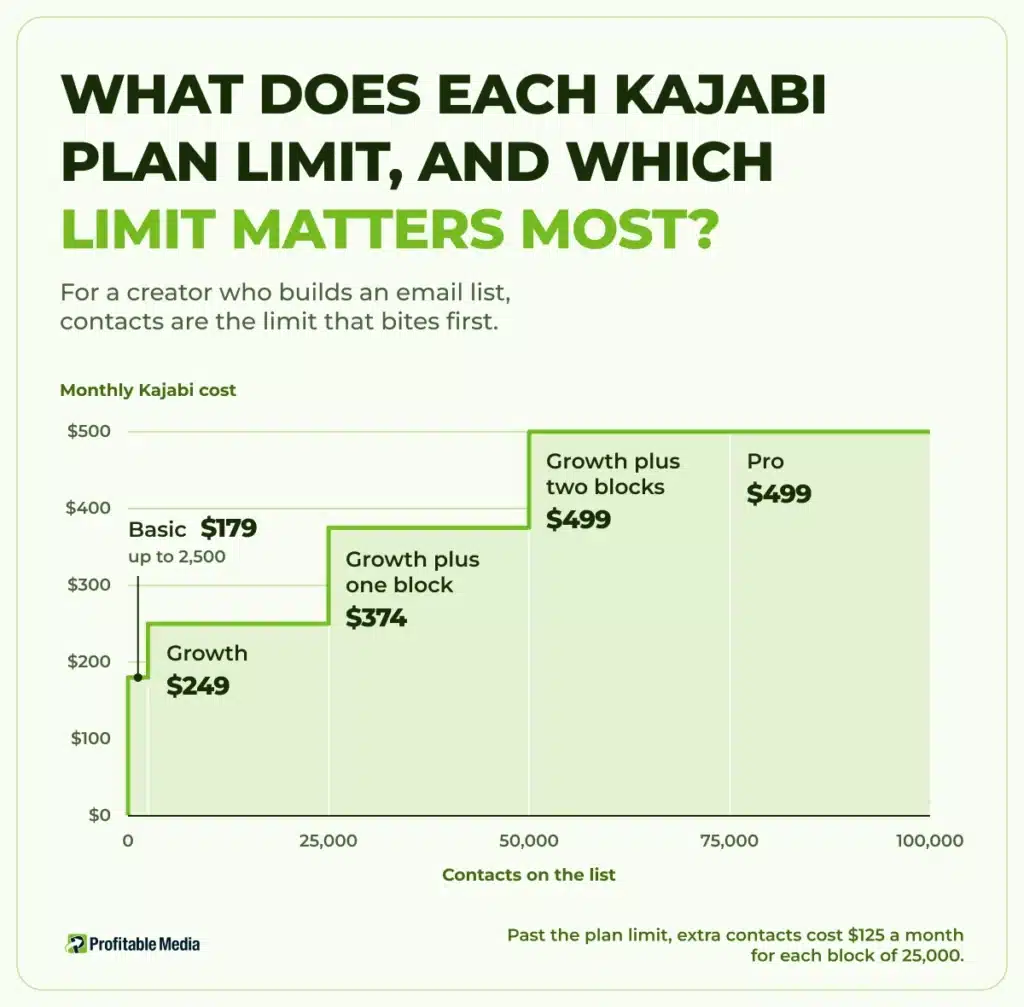
What does each Kajabi plan limit, and which limit matters most?
Four limits separate the plans:
- Products. Basic holds 5, Growth 50, and Pro unlimited. Each course, coaching program, newsletter, or podcast counts as one. Communities have their own limit: one on Basic and Growth, three on Pro.
- Contacts. Basic holds 2,500, Growth 25,000, and Pro 100,000.
- Admin users. Basic allows 2, Growth 11, and Pro 26.
- Pro-only features. The API, custom code, the branded app, and removing Kajabi branding all need the $499 plan.
For a creator who builds an email list, contacts are the limit that bites first. Kajabi’s pricing page itself says Growth makes sense once your list is past a few thousand people. Kajabi counts the people in your Contacts tab, and that tab keeps people who unsubscribed and people whose emails bounced, alongside every lead who never bought. Kajabi’s own advice for staying under the limit is to delete contacts who are not customers, have unsubscribed, and joined more than 60 days ago.
When you reach 100% of your limit, Kajabi emails you and gives you 30 days. After that, it locks you out of your account until you upgrade or delete contacts. Your customers still see your site, emails, and courses, but you can only open the account settings to upgrade.
Past the plan limit, extra contacts cost $125 a month for each block of 25,000. On Growth, a list of 30,000 costs $374 a month. A list of 75,000 costs $499, the same as Pro. Starting from an empty list, a lead magnet that brings in 500 sign-ups a month fills the Basic plan in five months.
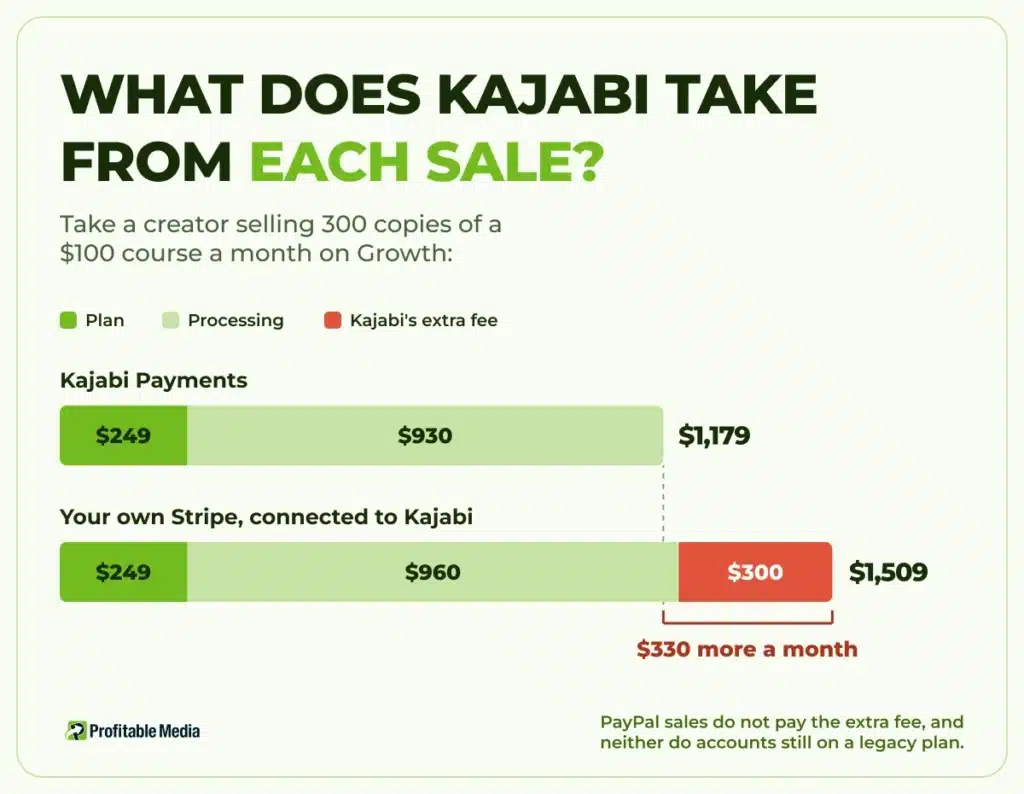
What does Kajabi take from each sale?
Kajabi takes no share of your revenue, but every sale pays a processing fee, and new plans add an extra fee if you use your own Stripe account.
On Kajabi Payments, US card fees are 2.9% plus 30 cents on Basic, 2.8% on Growth, and 2.7% on Pro. If you connect your own Stripe account to Kajabi instead, Stripe charges its standard 2.9% plus 30 cents, and Kajabi adds 2% on Basic, 1% on Growth, or 0.5% on Pro. That extra fee applies in countries where Kajabi Payments is available, which include the US. PayPal sales do not pay the extra fee, and neither do accounts still on a legacy plan.
Take a creator selling 300 copies of a $100 course a month on Growth:
| Payment setup | Plan | Processing | Kajabi's extra fee | Total a month |
|---|---|---|---|---|
| Kajabi Payments | $249 | $930 | $0 | $1,179 |
| Your own Stripe, connected to Kajabi | $249 | $960 | $300 | $1,509 |
Connecting your own Stripe costs $330 more a month, or $3,960 a year. Our guide to where to sell digital products runs the same $30,000 test across 13 platforms. Kajabi also collects sales tax through Kajabi Payments but does not file it, so the filing stays with you or your accountant.
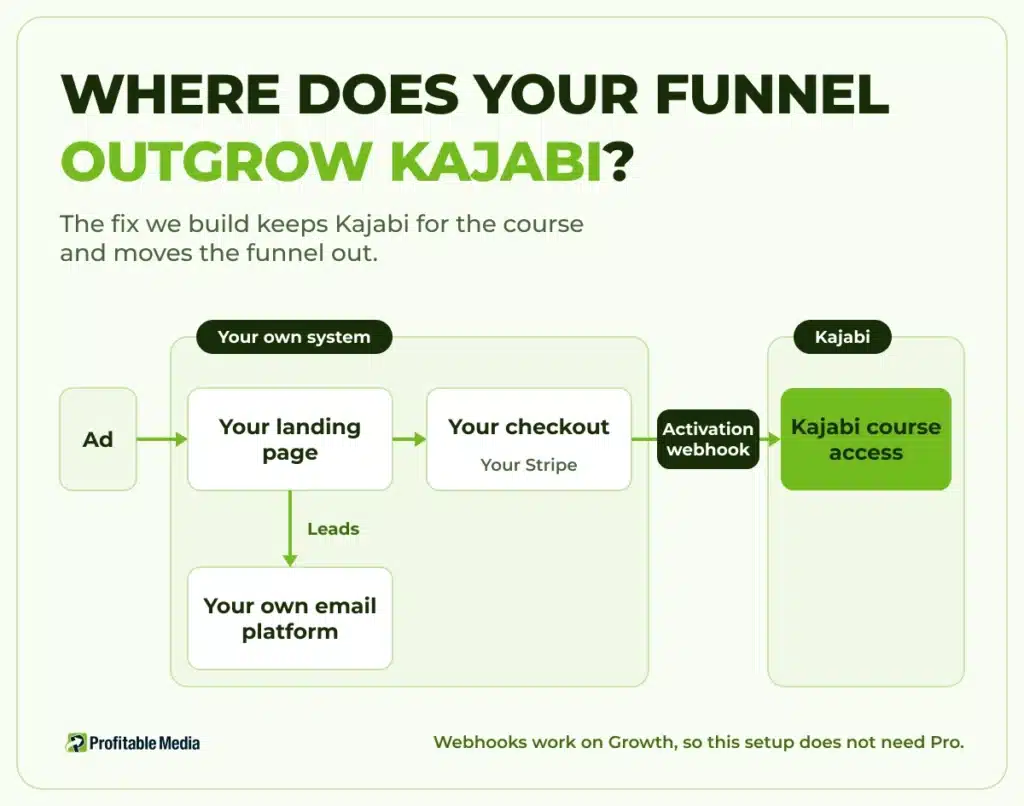
Where does your funnel outgrow Kajabi?
Kajabi works best when the whole business lives inside it. Once you buy traffic, two parts of the funnel start to strain it:
- Leads. Every opt-in from an ad lands on your contact limit, whether that person buys or not.
- Reporting. Kajabi’s Enhanced Checkout sends Purchase and Lead events to Meta’s Conversions API, which catches sales a browser pixel misses. Getting sales into your own reports, or into a tool Kajabi does not connect to, needs the API, and the API needs Pro.
The fix we build keeps Kajabi for the course and moves the funnel out. Your landing pages, lead capture, and checkout run on a system you own, and the checkout charges the buyer through your Stripe account directly, not through Kajabi. When someone buys, your checkout sends the sale to the offer’s activation webhook in Kajabi. Kajabi then gives the buyer access to the course and, if you choose, sends its access email. If a subscription payment fails, the deactivation webhook removes access. Webhooks work on Growth, so this setup does not need Pro.
Because Kajabi never processes the payment, its extra Stripe fee does not apply. For the same 300 sales, Stripe’s $960 plus the $249 Growth plan comes to $1,209 a month, within $30 of Kajabi Payments, before your email platform’s own cost. The saving is in the list. Leads who have not bought stay in your own email platform, so only customers count against Kajabi’s contact limit. A creator with 60,000 contacts and 5,000 customers pays $499 a month to hold that list on Kajabi, and $249 on Growth once only the customers are there.
The checkout also becomes yours. You decide what every sale reports to Meta, Google, and your own dashboards, without paying $499 for the API.
Upgrading to Pro gets you the API and 100,000 contacts for $499 a month, but every lead still counts. Moving the funnel out stops leads counting at all.
The hard part is mapping each sale to the right Kajabi offer, because a wrong mapping leaves paying members locked out. We have fixed that failure for a client with more than 1,200 active members who moved to a new Kajabi account. The offer IDs changed, but existing subscriptions still pointed at the old ones, so members could log in but could not see their content. We exported the subscribers, matched each one to the new offers, reassigned access in bulk, and told members before complaints started. Nobody cancelled.
Who is Kajabi a good fit for?
Perfect fit:
- Creators who want courses, community, coaching, and email under one login, with no developer.
- Businesses whose list is mostly buyers, so the contact limit tracks revenue.
- Creators who sell mainly to an audience they already have, rather than through paid ads.
Not a good fit:
- Creators running paid traffic to lead magnets who want the whole funnel inside Kajabi. Their list grows far faster than their sales.
- Anyone who only needs to host a course. Our Thinkific review covers a cheaper course platform.
- Businesses that want membership on their own WordPress site. Our MemberMouse review covers that route.
What should you do before you pick a Kajabi plan?
Three checks take an afternoon:
- Count your whole list. Include unsubscribed and bounced contacts, then compare the total with each plan’s contact limit.
- Price last month’s sales both ways. Work out the fee on Kajabi Payments and on your own Stripe, using the rates above.
- Run a test export. Export your contacts and check that the file holds every customer. The download link expires after three days.
The rule: keep the course on Kajabi, own the funnel
Kajabi is a good place to deliver a course and an expensive place to grow a list.
If you want your own funnel and checkout, book a 30-minute call with Profitable Media. Bring your Kajabi plan, your contact count, and last month’s sales. You leave with a plan for the funnel and checkout: what it runs on, how it connects to Kajabi, what it costs to build, and what we maintain after launch.
Frequently Asked Questions
How much does Kajabi cost per month?
Kajabi costs $179 a month on Basic, $249 on Growth, and $499 on Pro, or $143, $199, and $399 a month billed annually. Card processing comes on top, at 2.7% to 2.9% plus 30 cents a sale on Kajabi Payments in the US. If your list passes your plan’s contact limit, each extra 25,000 contacts costs $125 a month.
Does Kajabi charge transaction fees?
Kajabi takes no revenue share. Kajabi Payments charges card processing of 2.9% plus 30 cents on Basic, 2.8% on Growth, and 2.7% on Pro in the US. If you connect your own Stripe account on a current plan, Kajabi adds 2% on Basic, 1% on Growth, or 0.5% on Pro to each sale, on top of Stripe’s own fee, in countries where Kajabi Payments is available. PayPal sales are exempt.
Is Kajabi worth it?
Kajabi is worth it if you value one platform for courses, community, coaching, and email, and most of your list are buyers. It is not worth it if you only need to host a course, because cheaper course platforms do that well. It is also a poor deal if paid ads fill your list with leads, because every lead counts toward the contact limit that sets your price.
Can you leave Kajabi and keep your members?
You can export your contacts and customers to a CSV, up to your plan’s contact limit. Each member’s course access lives in a Kajabi offer, so a move means giving every member the right access on the new platform before you switch. That mapping is the step most likely to break. Plan it before the move, not after members start writing in.
Author
Dylan Jones is Operations Manager at Profitable Media. Dylan works on the operator’s side of the marketing stack: which platforms clients choose, what they cost at scale, what breaks in a migration, and when to stop paying for one. LinkedIn
Sources
- Kajabi, “Pricing”, Kajabi. Plans, limits, card rates, third-party payment fees, extra contacts, and the money-back guarantee.
- Kajabi, “Upcoming Changes to your Kajabi plan, Q4 2025”, Kajabi. The 13 January 2026 price change and the PayPal exemption.
- Kajabi Help Center, “Kajabi Payments Processing Fees”. The third-party processor fee.
- Kajabi Help Center, “Understand contact usage limits”. The 30-day grace period and lockout.
- Kajabi Help Center, “Understand subscription status”. Unsubscribed and bounced contacts in the Contacts tab.
- Kajabi Help Center, “Export contacts”. The export limit and three-day link.
- Kajabi Help Center, “Use webhooks with Kajabi”. Activation and deactivation webhooks on Growth and Pro.
- Kajabi Help Center, “Meta Pixel enhancements”. Purchase and Lead events through the Conversions API.
- Kajabi Help Center, “Kajabi Payments sales tax overview”.
- Stripe, “Pricing & Fees”, Stripe.
- Profitable Media, “Kajabi members lost access after migration. Here’s how we restored subscriptions without churn.”, 16 April 2026.