By Dylan Jones, Operations Manager at Profitable Media. Dylan writes about the operator’s view of the stack: choosing platforms, what they cost at scale, what breaks in a migration, and when to stop paying for one.
Key Takeaways
- All three self-serve tiers hold the same 10,000 students, so student count is not what moves you up a plan. Seats, bandwidth, branding and data access are.
- Thinkific’s transaction fee is not a platform cut. Thinkific Payments charges US and Canadian sellers 2.9% plus 30 cents, which is the standard card processing rate. Thinkific takes nothing on top of it.
- API and webhooks start at Grow, $164 a month on annual billing or $219 monthly. Until then you cannot reach your own enrollment and order data programmatically.
- Video bandwidth is metered at 100, 200 and 400 GB a month. A single six-hour course watched through by 30 students in a month can clear 360 GB, which puts a small catalogue on the third tier for bandwidth alone.
- Basic gives you one admin seat and five digital downloads. If you have a course manager or a VA, Basic is already out.
- Thinkific’s branding stays on your site until Grow. Removing it is a third-tier feature, not a setting.
- There is no free plan. The trial is 30 days with full access.
What Thinkific is
Thinkific is a hosted platform for selling and delivering online courses. You build the curriculum, upload the video, set the price. Thinkific handles the checkout, the student accounts, the content delivery and the progress tracking on its own infrastructure. Unlimited courses on every paid plan, a 30-day full-access trial, and no free tier.
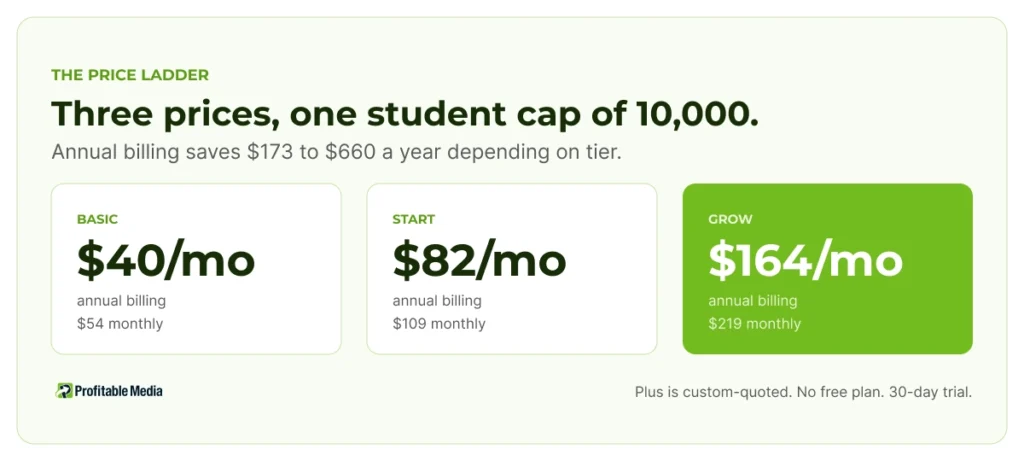
Thinkific offers four plans. On annual billing, Basic is $40 a month, Start is $82, and Grow is $164. Paid monthly those become $54, $109 and $219. Plus is custom and quoted by sales.
What nobody notices about the tiers
Basic, Start, and Grow all cap current students at 10,000. The same number on all three. So the usual logic for climbing a pricing ladder, outgrowing a limit, does not apply here until you are well past most course businesses.
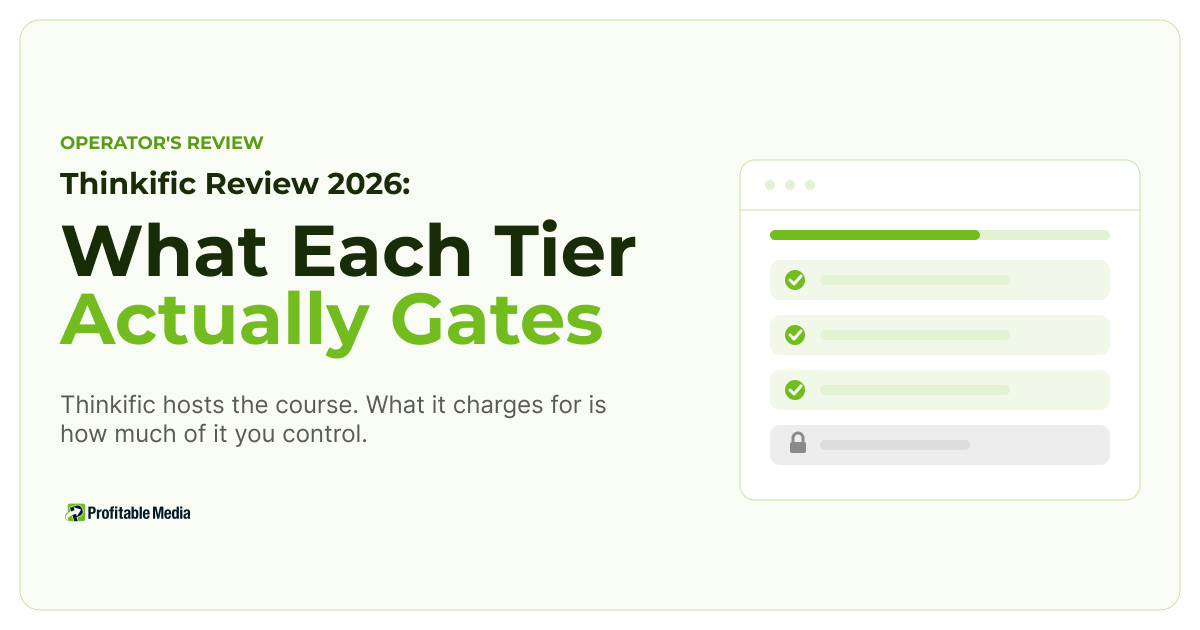
What separates the tiers is control.
| Basic | Start | Grow | |
|---|---|---|---|
| Current students | 10,000 | 10,000 | 10,000 |
| Admin seats | 1 | 2 | 6 |
| Video bandwidth | 100 GB/mo | 200 GB/mo | 400 GB/mo |
| Digital downloads | 5 | Unlimited | Unlimited |
| Communities | 1 | 1 | 3 |
| Memberships and bundles | No | Yes | Yes |
| Certificates | No | Yes | Yes |
| Remove Thinkific branding | No | No | Yes |
| API and webhooks | No | No | Yes |
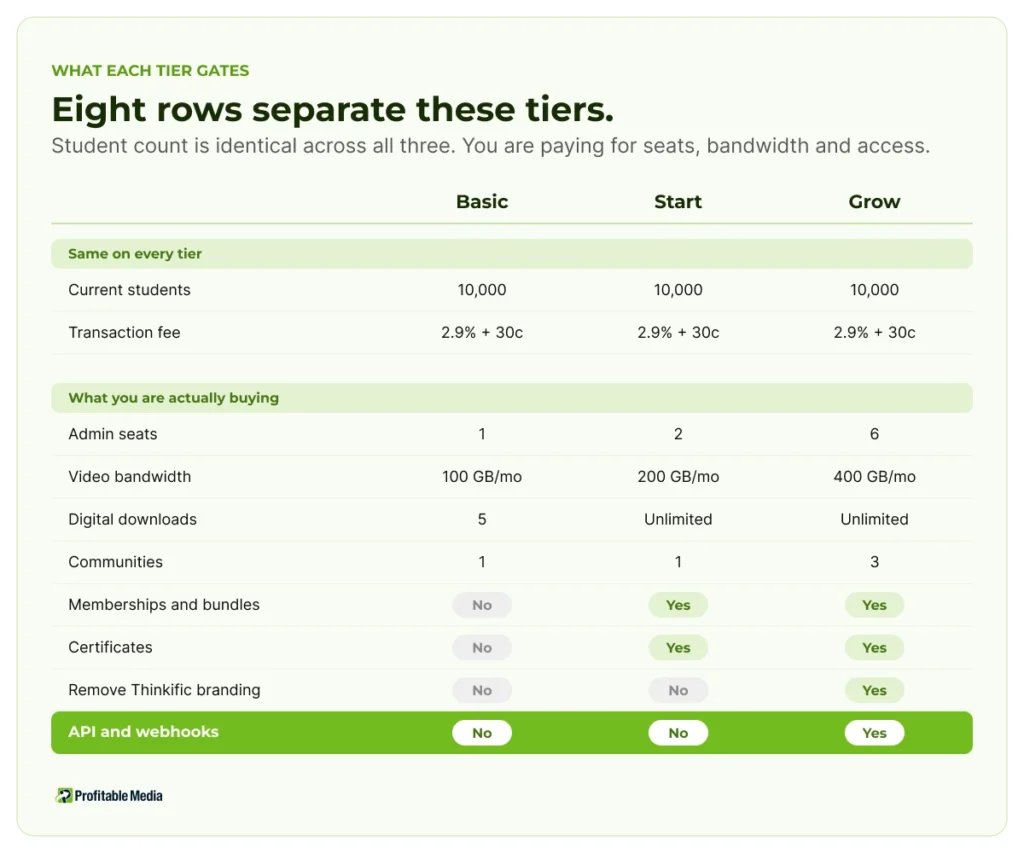
There are three rows worth discussing.
One admin seat on Basic. If a course manager, a VA or a contractor needs to log in, you are on Start at minimum. This catches people out more than the student cap ever will.
Thinkific’s branding stays until Grow. On Basic and Start, the platform’s name is on your student-facing pages. For a business selling a premium course, that is a positioning problem, and it is a $164-a-month fix.
API and webhooks are a Grow feature. More on that below, because it is the one that matters most and gets noticed last.
The bandwidth ceiling
Metered video bandwidth is unusual for a course platform, and it is the constraint most likely to force an upgrade you did not plan for.
The allowances are 100 GB a month on Basic, 200 GB on Start and 400 GB on Grow. That sounds generous until you convert it into hours watched.
Our rule of thumb is roughly 2 GB an hour for HD video, which is the range most streaming sits in. On that basis 100 GB is about 50 hours of video watched per month across every student you have. Not 50 hours of content. 50 hours of watching.
So take a six-hour course. Thirty students work through the whole thing inside one month. That is 180 hours, or roughly 360 GB.
That single course, with thirty active students, clears Basic and Start and lands in Grow territory on bandwidth alone, with nothing to do with your student count or your catalogue size. A modest course business with engaged students hits this wall well before it hits 10,000 enrolments.
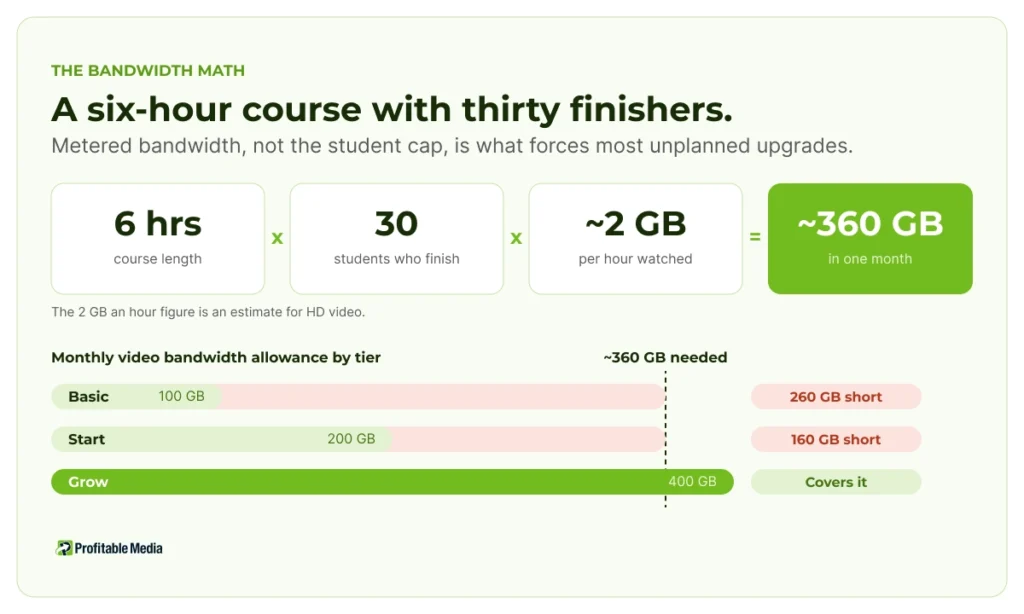
Check your own numbers before you pick a tier. Hours of video in the catalogue, multiplied by how many students finish it, is the calculation that matters.
What the transaction fee really is
Thinkific Payments charges sellers based in the US or Canada 2.9% plus 30 cents for every successful credit card payment. That figure appears on the pricing page next to every tier, including Plus, which makes it look like a platform fee you cannot escape.
It is not a platform fee. It is the card processing rate, and it is the same 2.9% plus 30 cents that Stripe publishes as its standard US rate. Thinkific is acting as the processor and charging the processor’s price. It takes no cut of its own on top.
The fee also does not vary by plan. Thinkific’s own documentation lists country, currency, student location and payment method as the variables. Plan tier is not one of them.
That’s a good deal, and it’s the opposite of how competing platforms price. Thinkific’s real cost isn’t the percentage on each sale; it’s the subscription tier you get pushed onto.
Why the API tier is the one that matters
Thinkific ships a REST API and webhooks, and the pricing page is unambiguous about where they start: not on Basic, not on Start, but on Grow.. Webhooks fire on platform events, orders.created among them, and post to a URL you control.
A webhook on order creation is what lets you send a conversion from your own server the moment a sale happens, instead of relying on a pixel firing in the student’s browser where ad blockers, Safari and Firefox tracking prevention, and declined consent all get a vote.

If you run paid acquisition into a Thinkific course, Grow is not the tier you grow into. It is your starting tier, because the two cheaper plans cannot report on ad spend in a way you would spend money against.
A course business on Grow is already paying for the webhook. Most have never fired one. The build is a small service that receives the orders.created webhook, sends server side conversions to the ad platforms, and reconciles Thinkific orders against the processor and the bank in one view. That is a custom integration rather than a settings toggle, and we have written separately about why the three numbers disagree in the first place.
Perfect fit
- You sell courses and you want hosting, delivery and checkout handled for you.
- Your students are under 10,000 and you are not close to that ceiling.
- You are happy on Thinkific Payments at the standard processing rate.
- You can start on Grow, or you run no paid traffic at all.
- Your catalogue is modest enough that metered bandwidth is not a live problem.
Not a good fit
- You run paid acquisition and want to start cheap. Basic and Start cannot give you webhook-based conversion tracking. You are on Grow, or you are spending against numbers you cannot check.
- You have a large video catalogue with engaged students. Do the bandwidth math before you commit to anything below Grow. A six-hour course and thirty finishers clears the first two allowances inside one month.
- Basic gives you one admin seat, so a second person in the back end puts you on Start.
- Removing Thinkific’s branding is a Grow feature, not a setting.
- There is no free plan. You get 30 days.
Do this before you pick a tier
These three checks will choose the plan for you faster than any feature comparison.
- Count your admin logins. More than one person needs access, Basic is out.
- Do the bandwidth math. Hours of video in your catalogue, times the number of students who finish it in a month, times about 2 GB. Compare that to 100, 200 and 400.
- Answer one question: are you buying traffic? If yes, price the plan at Grow and stop comparing it against Basic. You were never going to be on Basic.
Most people run the comparison on price and features and land on Start. Run it on these three and the answer is usually either Basic, because you are small and organic, or Grow, because you are neither.
The rule: Thinkific’s tiers price control, not scale
The student cap is the same on all three self-serve plans, and the transaction fee is the same on all four. What climbing the ladder buys you is admin seats, video bandwidth, your own branding on your own pages, and programmatic access to your own data.
That makes Thinkific easy to size correctly once you know it. Ignore the student count. Count your seats, calculate your bandwidth, and decide whether anyone is being paid to send you students. Those three answers pick the tier.
If you are paying $164 a month for an API you have never called, you are buying the tier and leaving the reason behind. Send us your Thinkific plan and your ad spend and we will tell you what that webhook is worth to you in a month.
Frequently Asked Questions
How much does Thinkific cost?
On annual billing Basic is $40 a month, Start is $82 and Grow is $164. Paid monthly those are $54, $109 and $219. Annual billing saves between $173 and $660 a year depending on tier. Plus is custom-quoted through sales. There is no free plan, but the 30-day trial gives full platform access.
Does Thinkific charge transaction fees?
Thinkific Payments charges US and Canadian sellers 2.9% plus 30 cents per successful card payment. That is the standard card processing rate rather than a platform cut, and Thinkific takes nothing on top of it. The rate does not change by plan tier. It does vary by country, currency, student location and payment method.
Does Thinkific have an API?
Yes, a REST API plus webhooks, and both start on the Grow plan. Basic and Start do not include them. Webhooks fire on platform events such as orders.created and post to an endpoint you control, which is what makes server side conversion tracking possible.
What is Thinkific's student limit?
All three self-serve plans, Basic, Start and Grow, cap current students at 10,000. The limit is identical across them, so student growth is not what pushes you up a tier. Plus supports more than 10,000 and is quoted individually.
Is Thinkific worth it?
For a course business that wants hosting and delivery handled, yes, and the processing rate is fair. Size the tier with care. One admin seat and 100 GB of bandwidth on Basic are tighter than they look, and if you run ads you need the Grow plan for webhooks, which changes the price you are really comparing.
Thinkific or Kajabi?
They target different buyers. Thinkific is the focused course platform and prices control by tier. Kajabi bundles marketing tooling into the same subscription at a higher entry price. Decide by how much of your funnel you want inside the platform: if email, funnels and checkout already live elsewhere in your stack, paying Kajabi for them again is waste.
Author
Dylan Jones is Operations Manager at Profitable Media, where he works on the operator’s view of the marketing stack: choosing platforms, what they cost at scale, what breaks in a migration, and when to stop paying for one. Profitable Media has built and managed marketing technology for direct response and creator businesses since 2009. Dylan on LinkedIn.
Sources
- Thinkific, “Pricing”, Thinkific. Plan names, monthly and annual prices, annual savings, student caps, admin seats, video bandwidth, digital download and community limits, and which features are gated to each tier including API and webhooks. Pricing and limits change, so confirm before quoting.
- Thinkific, “Thinkific Payments Supported Countries and Transaction Fees”, Thinkific Support. The 2.9% plus 30 cents rate for US and Canadian sellers, and the variables that change it.
- Thinkific, “Using Webhooks”, Thinkific Developers. Webhooks post to an endpoint you control; orders.created is among the available events.
- Stripe, “Pricing”, Stripe. The 2.9% plus 30 cents standard US rate, used to establish that Thinkific’s fee is the processing rate rather than a platform surcharge.
Prices, plan limits and processing rates checked August 2026.