By Dylan Jones, Operations Manager at Profitable Media. Dylan writes about the operator’s view of the stack: choosing platforms, what they cost at scale, what breaks in a migration, and when to stop paying for one.
Key takeaways
- Kartra prices you on the size of your contact list, buyers and free sign-ups alike. Each plan caps contacts, and when you pass the cap, Kartra moves you up a plan automatically and charges the difference for the rest of the billing cycle.
- Only the cheapest plan takes a cut of your sales. Essentials charges 5% of every sale. Starter, Growth, and Professional charge 0%, and you pay your own payment processor’s fees on every plan.
- We priced Kartra for a creator selling $30,000 a month, from 300 sales of a $100 course. Platform and processing fees come to $1,079 a month on Starter, $1,189 on Growth, and $1,509 on Professional. Your contact count decides which of those you pay.
- For a creator growing a list with ads, the better setup runs the funnel and checkout on a system you own. Leads sit in an email platform you choose, so Kartra’s automatic upgrades no longer set your costs, and you own the checkout and the sales data it sends.
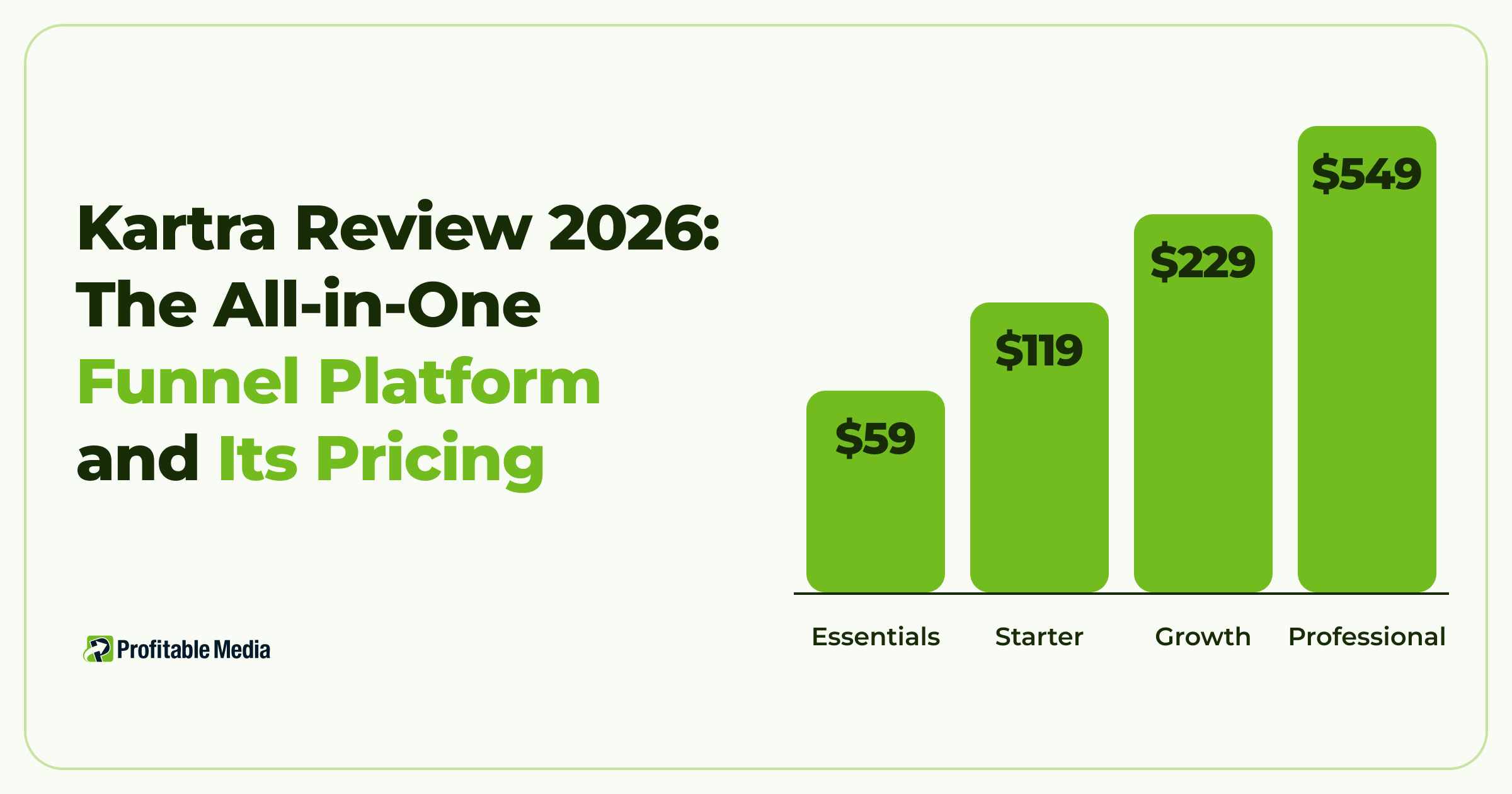
Kartra is worth it if you want pages, funnels, email, checkout, and memberships in one account, and you don’t want to connect separate tools. It can cost anywhere from $59 to $549 a month, depending on how many contacts you hold. When paid traffic adds leads much faster than it adds buyers, every free sign-up pushes you toward a bigger plan, so move the funnel and checkout to a system you own.
Profitable Media builds and maintains custom funnels and checkouts for clients. See how we build funnels and checkouts.
What is Kartra?
Kartra is an all-in-one marketing platform for coaches, course creators, and small online businesses. It hosts the pages that capture leads, sends the emails that follow up, runs the checkout, and delivers the product, all from one account. Kartra says more than 60,000 businesses use it.
The platform covers the main parts of a sales funnel:
- Pages and funnels. A drag-and-drop page builder with templates, plus multi-page funnel flows that move a visitor from opt-in to purchase.
- Email and SMS. Broadcasts and automated sequences sent to your lists and tags.
- Checkouts. Order forms that charge cards and PayPal through a payment account you connect.
- Memberships. A portal that hosts courses and training.
- Lead management. A contact database you sort with lists and tags.
Growth and Professional add affiliate management, a helpdesk, and API access. Kartra does not process payments itself. It connects to your own Stripe, PayPal, Authorize.net, or Braintree account, so the money lands in your account and your processor’s fees apply.
Where Kajabi builds around the course, Kartra builds around the funnel. Its feature list opens with landing pages and funnels, and memberships come later as one tool among several. Our Kajabi review covers the course-first alternative.
How much does Kartra cost?
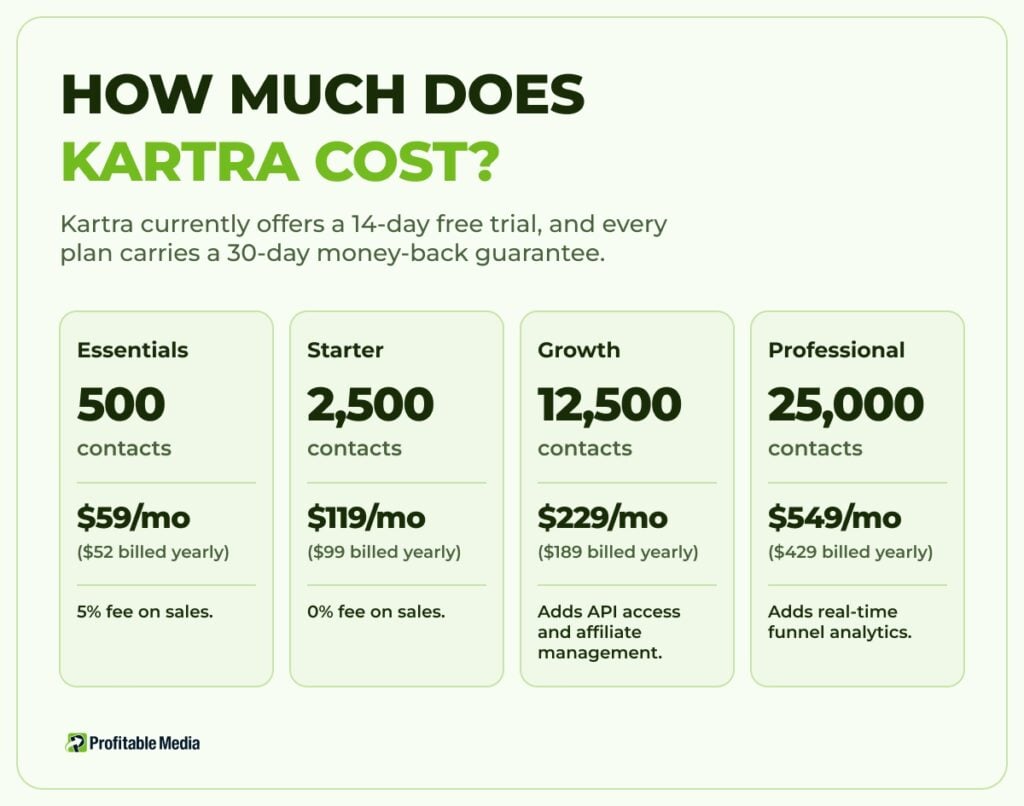
Kartra costs $59 a month on Essentials, $119 on Starter, $229 on Growth, and $549 on Professional. Billing yearly cuts the price to $52, $99, $189, and $429 a month.
| Plan | Monthly | Billed yearly | Contacts | Emails a month | Products | Custom domains | Fee on sales |
|---|---|---|---|---|---|---|---|
| Essentials | $59 | $52/mo | 500 | 10,000 | 1 | 1 | 5% |
| Starter | $119 | $99/mo | 2,500 | Unlimited | Unlimited | 1 | 0% |
| Growth | $229 | $189/mo | 12,500 | Unlimited | Unlimited | 3 | 0% |
| Professional | $549 | $429/mo | 25,000 | Unlimited | Unlimited | 5 | 0% |
Kartra currently offers a 14-day free trial, and every plan carries a 30-day money-back guarantee.
What does each Kartra plan limit, and which limit matters most?
Four limits separate the plans:
- Contacts. Essentials holds 500, Starter 2,500, Growth 12,500, and Professional 25,000.
- Products and pages. Essentials allows one product, one membership, and five pages. Starter and above remove those caps.
- Fee on sales. Essentials takes 5% of every sale. The other plans take nothing.
- Growth-tier tools. Affiliate management, the helpdesk, API access, custom code pages, and advanced automations start on Growth. For real-time funnel analytics and helpdesk live chat, you need Professional.
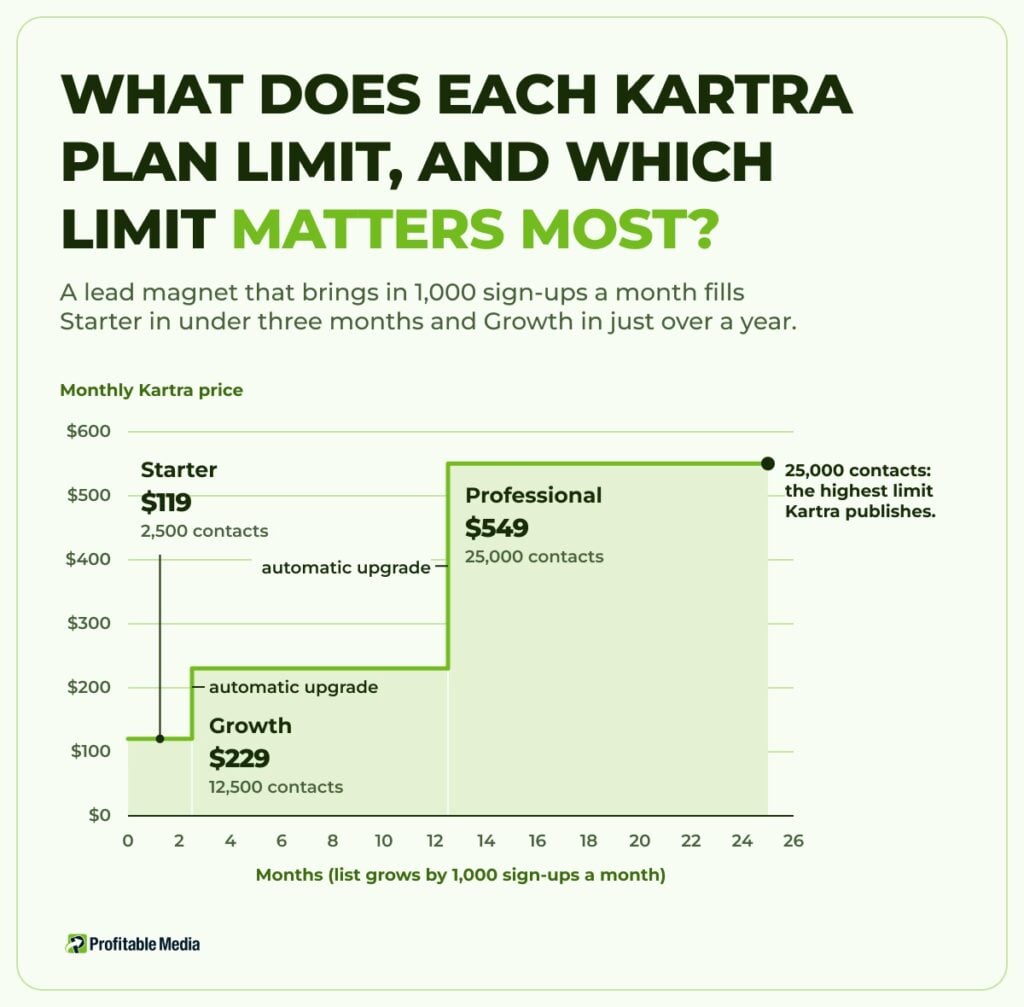
Kartra’s plans count leads and customers together, and Kartra never stops new leads from joining. When you reach your plan’s limit, Kartra upgrades you to the next plan that fits your list and charges a mid-cycle fee for the difference in price over the days left in your billing cycle. From the next billing date, you pay the full price of the new plan.
Kartra sells no contact add-ons, so the only way to hold more leads is a bigger plan. Domains, team members, and languages work differently: hitting those limits triggers no automatic upgrade, and you choose whether to upgrade yourself.
A lead magnet that brings in 1,000 sign-ups a month fills Starter in under three months and Growth in just over a year. Just over two years in, the list reaches 25,000, the highest limit Kartra publishes. None of those sign-ups have to buy anything.
What does Kartra take from each sale?
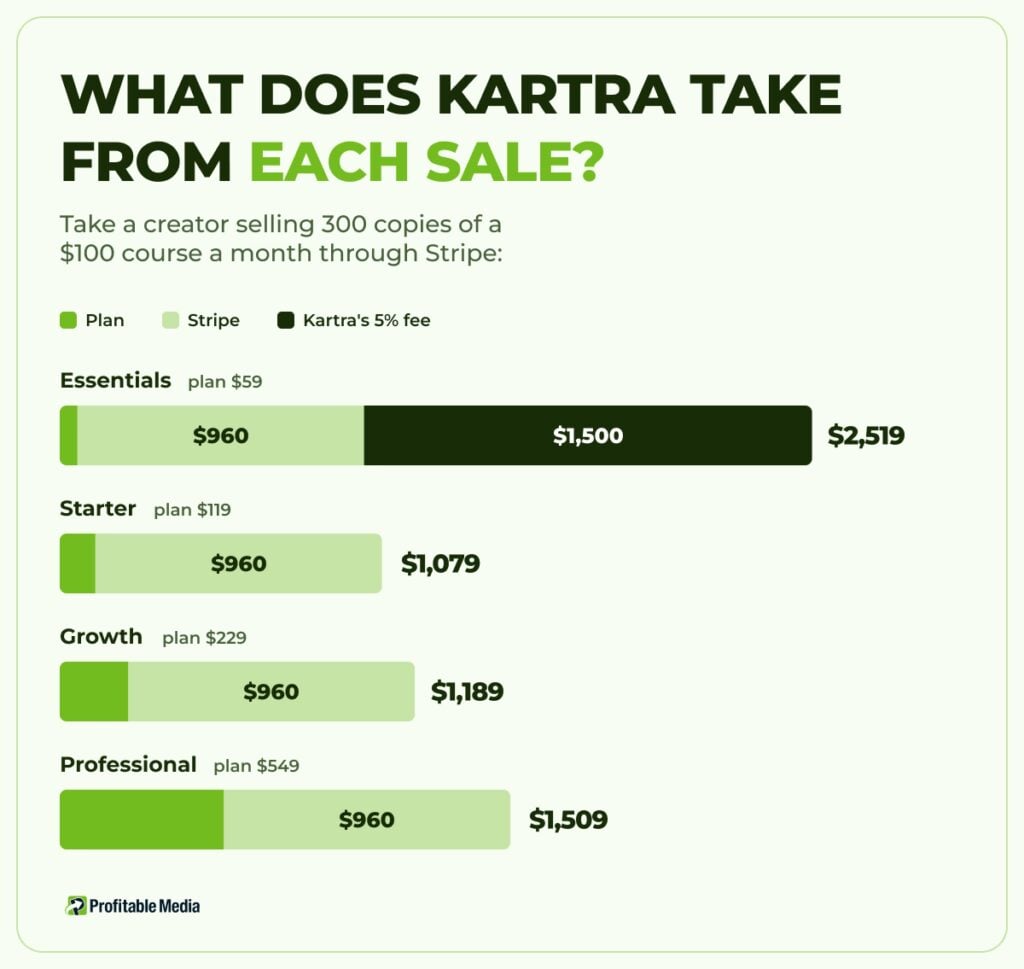
On Starter, Growth, and Professional, Kartra takes nothing from your sales. Your payment processor still charges its own fee. Stripe’s standard US rate is 2.9% plus 30 cents per card payment.
Essentials is the exception. It charges 5% of every sale on top of the processor’s fee. Kartra’s pricing FAQ says the subscription is a flat rate with “never any extra fees,” but the same page lists the 5% fee on Essentials, and the plan charges it.
Take a creator selling 300 copies of a $100 course a month through Stripe:
| Plan | Plan price | Stripe processing | Kartra's fee on sales | Total a month |
|---|---|---|---|---|
| Essentials | $59 | $960 | $1,500 | $2,519 |
| Starter | $119 | $960 | $0 | $1,079 |
| Growth | $229 | $960 | $0 | $1,189 |
| Professional | $549 | $960 | $0 | $1,509 |
Essentials costs the most at this volume, and its 500-contact cap fills with buyers alone in under two months. On the other plans, the price depends on your contact count, and buyers are only part of it. At 300 sales a month, buyers alone fill Starter in about eight months. Every free sign-up from a lead magnet counts the same as a buyer, so a list-building funnel reaches Growth and Professional much sooner. Our guide to where to sell digital products runs the same $30,000 test across 13 platforms.
Where does your funnel outgrow Kartra?
Kartra works best when the list grows mostly from buyers. Once you buy traffic to a lead magnet, two parts of the funnel start to strain it. Every opt-in from an ad lands in your Kartra account and counts toward your plan, whether that person buys or not. And Kartra’s API needs Growth or above, so connecting Kartra to your own systems through the API starts at $229 a month.
The fix we build moves the funnel onto a system you own. Your landing pages, lead capture, and checkout run on your own site, and the checkout charges the buyer through your own Stripe account. Leads go into an email platform you choose. Most email platforms also price on contacts, so the list still costs money as it grows. The difference is that you pick the tool and its pricing, and a growing list no longer forces an automatic upgrade of the system that runs your pages and checkout.
The checkout becomes yours, too. You decide what every sale reports to Meta, Google, and your own dashboards, and you can change the order form, the upsells, and the tracking whenever you need to.
Owning the funnel doesn’t make the first month cheaper. You pay for the build, your email platform, and hosting. In return, each part of the funnel has its own price, so you can switch email tools when the list outgrows one without moving your pages and checkout.

Who is Kartra a good fit for?
Perfect fit:
- Creators and coaches who want pages, email, checkout, and memberships under one login, with no developer.
- Businesses whose list grows mostly from buyers, so the contact limit tracks revenue.
- Sellers who want to keep their own Stripe or PayPal account and pay no platform fee on sales.
Not a good fit:
- Creators running paid traffic to lead magnets who want the whole funnel inside Kartra. Their list grows far faster than their sales.
- Anyone who mainly sells a course and wants a platform built around courses and community. Our Kajabi review and Thinkific review cover those.
- Anyone on Essentials selling more than about $1,200 a month. Above that, the 5% fee costs more than the $60 a month extra for Starter.
What should you do before you pick a Kartra plan?
Three checks take an afternoon:
- Count every lead. Take your whole list, buyers and non-buyers, and compare it with each plan’s contact limit. Then add your monthly opt-ins to see when you’ll pass it.
- Price last month’s sales. Add your processor’s fees to each plan price, and add 5% of sales if you’re looking at Essentials.
- List the tools you need. If you need affiliates, a helpdesk, or the API, start your comparison at Growth, not Starter.
The rule: move the funnel off Kartra when ads drive your list
Kartra works well when your list grows about as fast as your buyers. When ads fill the list with free sign-ups, each one pushes you toward a bigger Kartra plan.
If you want your own funnel and checkout, book a 30-minute call with Profitable Media. Bring your Kartra plan, your contact count, and last month’s sales. You leave with a plan for the funnel and checkout: what it runs on, how leads and sales flow through it, what it costs to build, and what we maintain after launch.
Frequently Asked Questions
How much does Kartra cost per month?
Kartra costs $59 a month on Essentials, $119 on Starter, $229 on Growth, and $549 on Professional, or $52, $99, $189, and $429 a month billed yearly. Your payment processor’s fees come on top, and Essentials adds 5% of every sale. If your list passes your plan’s contact limit, Kartra moves you to the next plan automatically.
Is Kartra an all-in-one platform?
Yes. Kartra combines a page and funnel builder, email and SMS, checkouts, memberships, and lead management in one account. Growth and Professional add affiliate management and a helpdesk. It does not process payments itself, so you connect your own Stripe, PayPal, Authorize.net, or Braintree account.
Is Kartra worth it?
Kartra is worth it if you want one platform for your pages, emails, checkout, and course, and most of your contacts are buyers. It is a poor deal if paid ads fill your list with leads who don’t buy, because every sign-up counts toward the contact limit that sets your price, the same as a buyer.
What is the difference between Kartra and Kajabi?
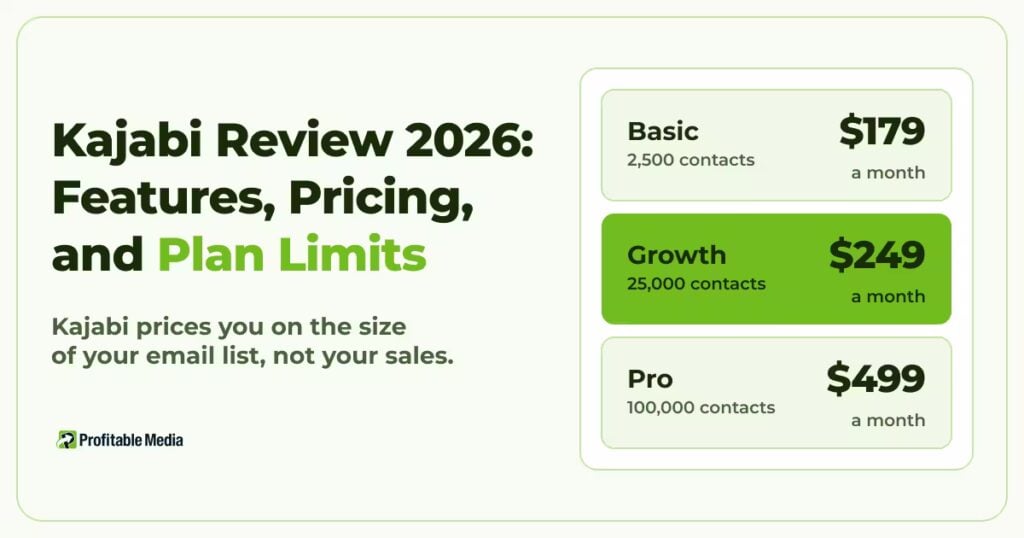
Kartra builds around the sales funnel, and Kajabi builds around the course, community, and coaching. Both price on contacts. Kartra costs less at the low end: Starter holds 2,500 contacts for $119 a month, against $179 on Kajabi Basic. Kajabi costs less higher up: its Growth plan holds 25,000 contacts for $249, while Kartra charges $549 for 25,000 on Professional. Kartra charges no fee on sales from Starter up, while Kajabi’s current plans add a fee when you connect your own Stripe account. Our Kajabi review covers its plans in full.
Author
Dylan Jones is Operations Manager at Profitable Media. Dylan works on the operator’s side of the marketing stack: which platforms clients choose, what they cost at scale, what breaks in a migration, and when to stop paying for one. LinkedIn
Sources
- Kartra, “Plans and Pricing”, Kartra. Plans, yearly prices, contact and feature limits, the 5% Essentials fee, automatic upgrades, the free trial, and the money-back guarantee.
- Kartra Help Center, “Upgrade my Kartra plan”. How Kartra charges the mid-cycle upgrade fee.
- Kartra, “Integrations and APIs”, Kartra. Supported payment gateways.
- Stripe, “Pricing & Fees”, Stripe.
- Kajabi, “Pricing”, Kajabi. Basic and Growth plan prices and contact limits, and the third-party payment fee.